> ## Documentation Index
> Fetch the complete documentation index at: https://docs.blacksmith.sh/llms.txt
> Use this file to discover all available pages before exploring further.
# Test Analytics
> Easiest way to monitor your test suite health across your team
## Overview
Blacksmith automatically detects the tests that are running in your repository
for all jobs that are run on Blacksmith runners.
**No configuration required**.
Blacksmith's Test Analytics provides a way to quickly identify failing tests and
how to fix them with inline logs.
All users within your organization who have access to GitHub can log
in at [app.blacksmith.sh](https://app.blacksmith.sh) to view tests on their jobs.
## Basics
### Job Tests
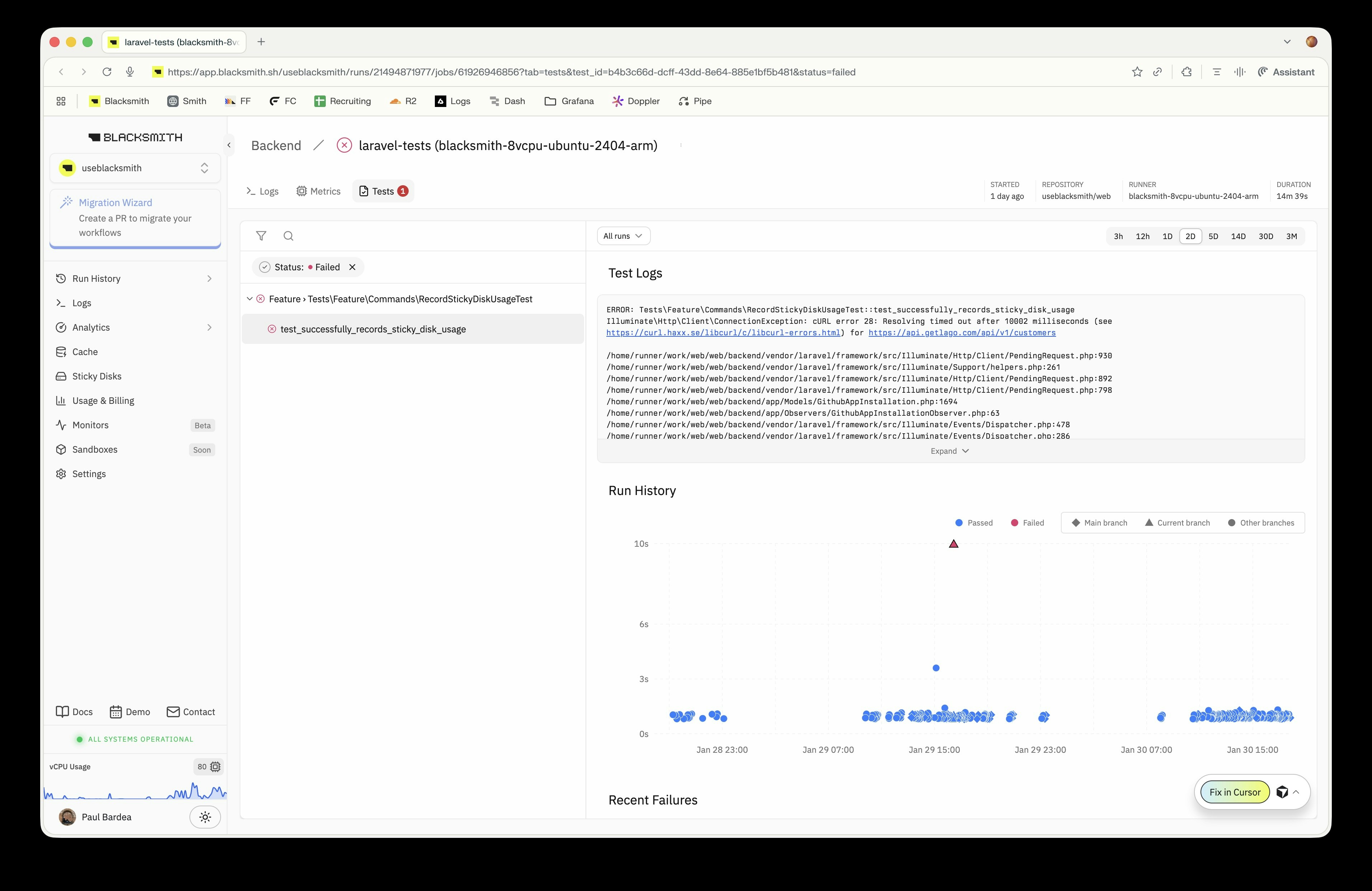
The Tests tab in the Job Details view in the dashboard lists out all parsed
tests associated with a job run.
 #### JUnit Test Parsing
If your test suite outputs a JUnit XML file, Blacksmith will automatically parse
it and extract structured test information directly in the Blacksmith dashboard.
#### Auto-Parsed Tests
Blacksmith will automatically parse your job logs for output that looks like
test runs and convert them into a structured format to easily search through
your tests and identify test failures.
Auto-parsing tests is still a best-effort basis. *It is still recommended to
output a stuctured JUnit XML summary of your test run for best results.*
JUnit XML files will take precedence over auto-parsed test results from log
output.
### GitHub Comment
By default, when CI jobs are failing on your PR, Blacksmith will post a GitHub
comment with specific test failures if any are detected.
#### JUnit Test Parsing
If your test suite outputs a JUnit XML file, Blacksmith will automatically parse
it and extract structured test information directly in the Blacksmith dashboard.
#### Auto-Parsed Tests
Blacksmith will automatically parse your job logs for output that looks like
test runs and convert them into a structured format to easily search through
your tests and identify test failures.
Auto-parsing tests is still a best-effort basis. *It is still recommended to
output a stuctured JUnit XML summary of your test run for best results.*
JUnit XML files will take precedence over auto-parsed test results from log
output.
### GitHub Comment
By default, when CI jobs are failing on your PR, Blacksmith will post a GitHub
comment with specific test failures if any are detected.
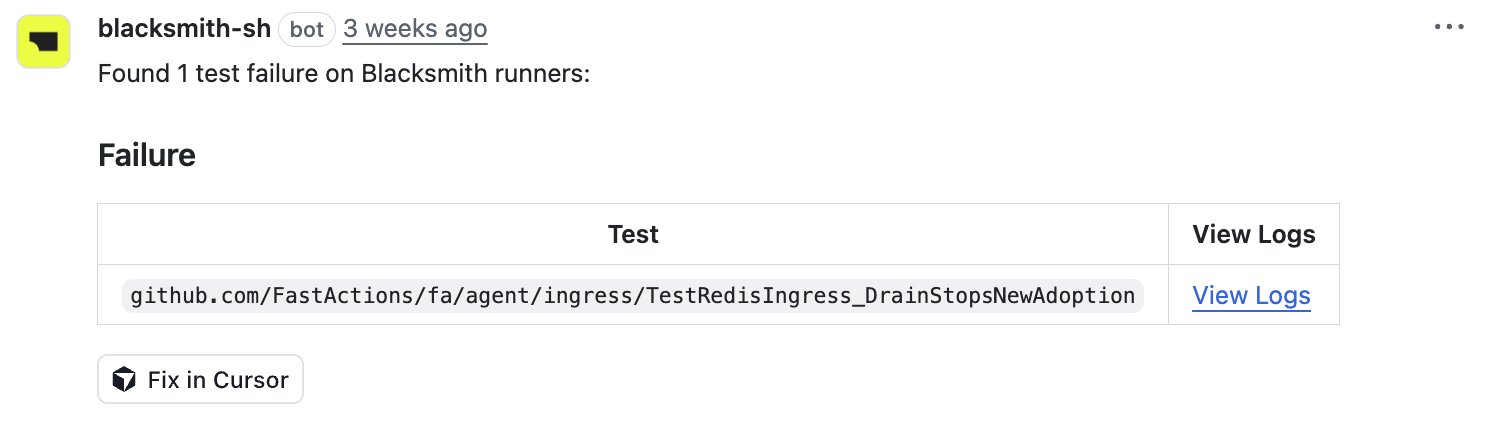 You can manage the GitHub comment settings on your settings page.
## Pricing
There is no additional cost for using this feature. For all other pricing,
please visit our [pricing page](https://www.blacksmith.sh/pricing).
## FAQ
We're working on improving the auto-test parsing to support more languages
and output formats.
We aim to support most popular test libraries. Currently supported libraries are:
* Jest
* Pytest
* Rspec
* Vitest
* Mocha
* Go `testing`
* Playwright
If your library isn't listed, you can always output a strucutred JUnit XML
summary of your tests, which is supported by most testing libraries.
Blacksmith will automatically parse them out and use it as the canonical
source of truth for your tests.
All JUnit XML files written to disk during the lifetime of a job will be
automatically detected and parsed by Blacksmith. No configuration required.
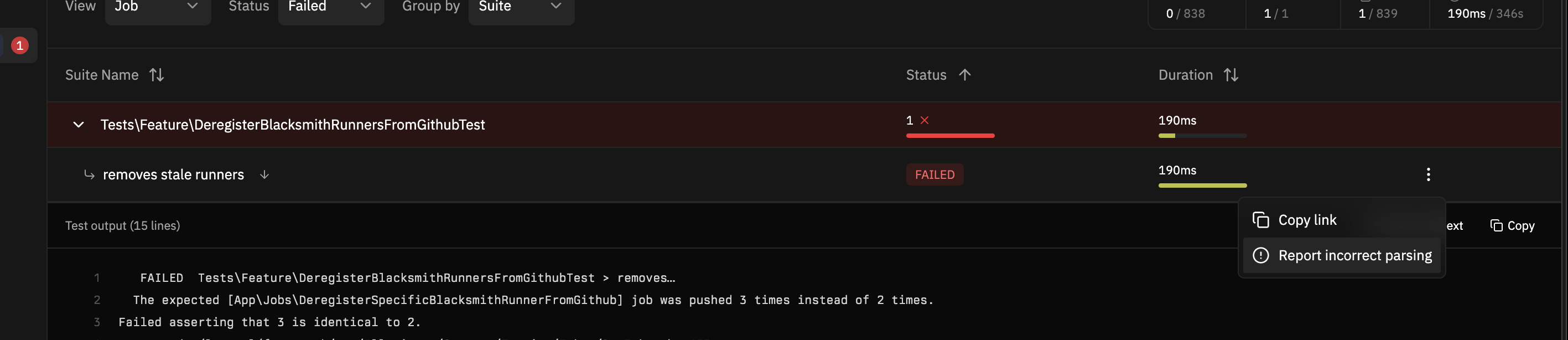
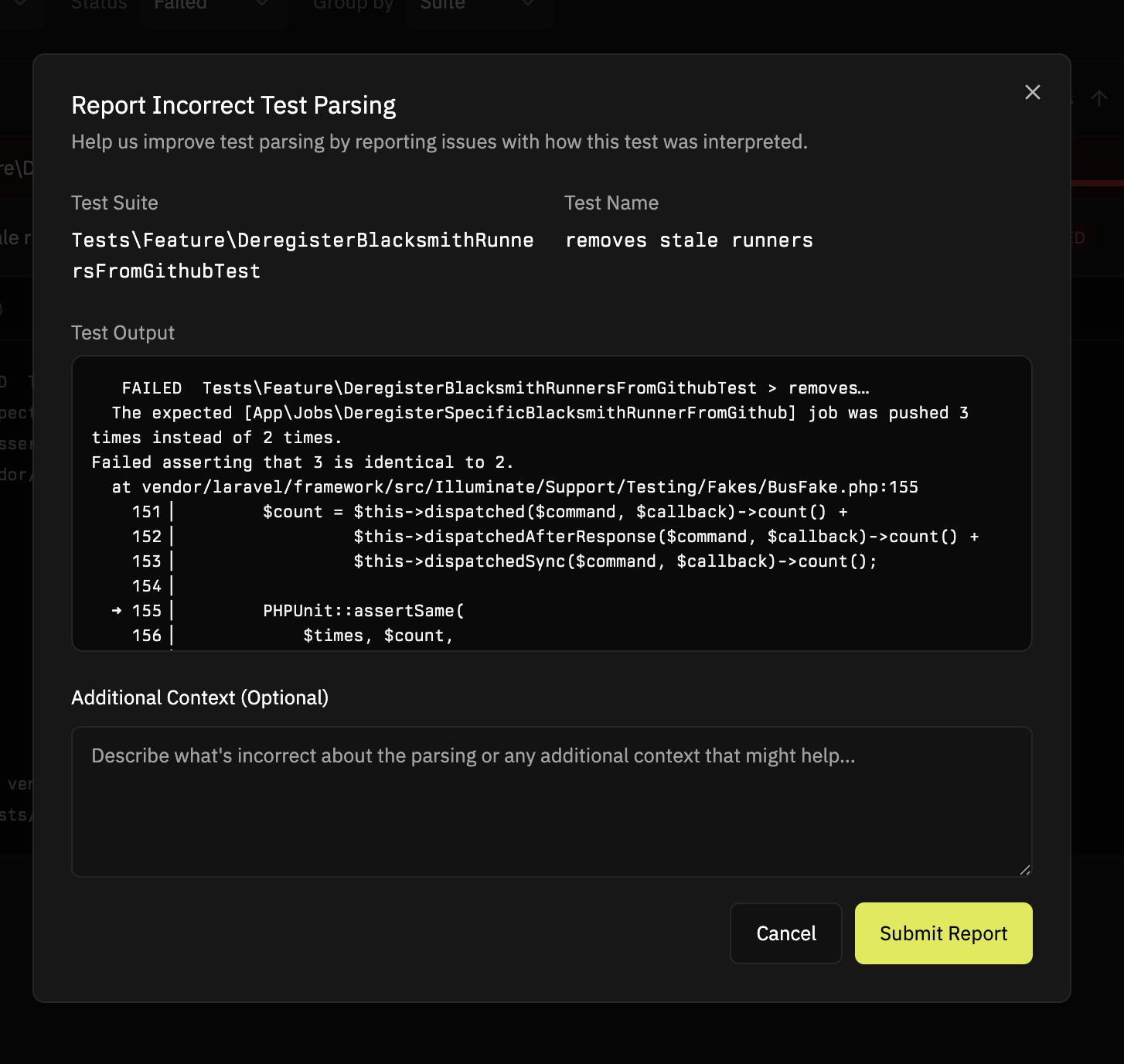
If you see incorrect test entries or incorrect logs associated with your
tests, help our team fix them by reporting errors directly inline.
Go to an incorrectly parsed tests and in the context menu, select "Report
Incorrect Test Parsing" and fill out the modal with any additional
information.
You can manage the GitHub comment settings on your settings page.
## Pricing
There is no additional cost for using this feature. For all other pricing,
please visit our [pricing page](https://www.blacksmith.sh/pricing).
## FAQ
We're working on improving the auto-test parsing to support more languages
and output formats.
We aim to support most popular test libraries. Currently supported libraries are:
* Jest
* Pytest
* Rspec
* Vitest
* Mocha
* Go `testing`
* Playwright
If your library isn't listed, you can always output a strucutred JUnit XML
summary of your tests, which is supported by most testing libraries.
Blacksmith will automatically parse them out and use it as the canonical
source of truth for your tests.
All JUnit XML files written to disk during the lifetime of a job will be
automatically detected and parsed by Blacksmith. No configuration required.
If you see incorrect test entries or incorrect logs associated with your
tests, help our team fix them by reporting errors directly inline.
Go to an incorrectly parsed tests and in the context menu, select "Report
Incorrect Test Parsing" and fill out the modal with any additional
information.
 Please check the following if you're not seeing any parsed tests when you expect to:
* Ensure that the job ran the tests and it didn't error before tests got to
run.
* If you're not emitting a JUnit XML report for your test suite, ensure that
the test results are logged to the job output with the test suite and test
case name.
* If you're still not seeing test results, consider configuring your test
suite provider to emit a strucutred JUnit XML for better results. The JUnit
XML file can be written anywhere you'd like and the Blacksmith runners will
automatically detect it.
In the feature settings on the [Blacksmith
Dashboard](https://app.blacksmith.sh) you can control whether the GitHub
comments that Blacksmith posts are posted on behalf of the user creating the
PR.
GitHub comments posted on behlaf of the PR author (e.g. email notifications,
Linear, etc) will not trigger a notification on the PR.
Note: The PR author needs to have signed into the Blacksmith dashboard for
the Blacksmith bot to post on behalf of a user. See [GitHub's
docs](https://docs.github.com/en/apps/creating-github-apps/authenticating-with-a-github-app/authenticating-with-a-github-app-on-behalf-of-a-user)
for more information.
Please check the following if you're not seeing any parsed tests when you expect to:
* Ensure that the job ran the tests and it didn't error before tests got to
run.
* If you're not emitting a JUnit XML report for your test suite, ensure that
the test results are logged to the job output with the test suite and test
case name.
* If you're still not seeing test results, consider configuring your test
suite provider to emit a strucutred JUnit XML for better results. The JUnit
XML file can be written anywhere you'd like and the Blacksmith runners will
automatically detect it.
In the feature settings on the [Blacksmith
Dashboard](https://app.blacksmith.sh) you can control whether the GitHub
comments that Blacksmith posts are posted on behalf of the user creating the
PR.
GitHub comments posted on behlaf of the PR author (e.g. email notifications,
Linear, etc) will not trigger a notification on the PR.
Note: The PR author needs to have signed into the Blacksmith dashboard for
the Blacksmith bot to post on behalf of a user. See [GitHub's
docs](https://docs.github.com/en/apps/creating-github-apps/authenticating-with-a-github-app/authenticating-with-a-github-app-on-behalf-of-a-user)
for more information.