# Privacy Policy
Source: https://docs.blacksmith.sh/about/privacy-policy
## Owner and Data Controller
Blacksmith Software Inc. 95 Third Street, 2nd Floor, San Francisco CA, 94103, United States
Owner contact email: [hello@blacksmith.sh](mailto:hello@blacksmith.sh)
## Types of Data Collected
Blacksmith Software Inc. ("Blacksmith") collects the following types of Personal Data when you sign in with your GitHub account and set up our GitHub integration in your organization: GitHub webhook metadata used for billing purposes and to provide analytics on your GitHub Actions performance and trends, as well as payment information, including credit card details securely processed through Stripe for monthly billing based on your usage. This data is collected automatically through your interactions with the service and is essential for Blacksmith to deliver and improve its offerings. Users are responsible for ensuring they have consent to provide any third-party Personal Data and understand that withholding mandatory data may affect the functionality of the Service.
## Mode and place of processing the Data
### Methods of processing
Blacksmith Software Inc. ("Blacksmith") implements robust industry-standard security measures to protect your data from unauthorized access, disclosure, modification, or destruction.
Data processing is performed following strict organizational procedures aligned with the purposes outlined in this Privacy Policy.
In addition to Blacksmith's internal teams responsible for administration, sales, marketing, legal, and system administration, your data may be accessed by trusted third-party service providers, including payment processors like Stripe, hosting providers, and communication tools appointed as Data Processors.
These external parties are bound by confidentiality agreements and are only granted access as necessary to provide the Service. An updated list of these Data Processors is available upon request from Blacksmith by contacting [hello@blacksmith.sh](mailto:hello@blacksmith.sh).
### Legal basis of processing
Blacksmith Software Inc. ("Blacksmith") processes Personal Data of Users based on the following legal grounds: (1) **Consent:** Users have provided explicit consent for specific purposes, such as billing and analytics related to GitHub Actions performance; (2) **Contractual Necessity:** Processing is necessary to fulfill our service agreement with Users, including running GitHub Actions runners and managing billing through Stripe; (3) **Legal Obligations:** We process data to comply with applicable legal requirements and regulations; (4) **Legitimate Interests:** Processing is essential for our legitimate business interests, such as improving service performance and ensuring secure operations. Importantly, Blacksmith does **not** use Personal Data for any Artificial Intelligence (AI) or Machine Learning (ML) purposes. In jurisdictions where consent is not required for certain processing activities, Blacksmith relies on these alternative legal bases. Users may contact Blacksmith to clarify the specific legal basis applicable to their data processing, including whether providing Personal Data is a statutory or contractual requirement or necessary to enter into a contract.
### Place
Blacksmith Software Inc. ("Blacksmith") processes Personal Data on our servers located in the United States and the European Union. Depending on your location, your data may be transferred between these regions. If you have concerns about where your data is processed, you may request to have your workload moved to a specific region by contacting us at [hello@blacksmith.sh](mailto:hello@blacksmith.sh). While we will consider such requests, relocation of data processing is not guaranteed until an agreement is reached. For more information about data processing locations, data transfers, and the legal basis for transferring data, please contact us directly.
### Retention
Blacksmith Software Inc. ("Blacksmith") retains Personal Data only for as long as necessary to fulfill the purposes for which it was collected. Personal Data related to the performance of a contract between Blacksmith and the User is retained until the contract is fully performed. Data processed under Blacksmith's legitimate interests is kept as long as needed to achieve those purposes. Additionally, Personal Data may be retained longer if required by law or with the User's explicit consent, which can be withdrawn at any time. While you are a customer, your data will not be deleted. Upon termination of the agreement or upon your request, Blacksmith will delete all relevant user data within **30 days** using industry-standard methods, ensuring compliance with backup and security protocols. To request data deletion, please contact us at [hello@blacksmith.sh](mailto:hello@blacksmith.sh). Once the retention period has expired, your rights to access, erase, rectify, and port data cannot be enforced.
## Detailed information on the processing of Personal Data
Personal Data is collected for the following purposes and using the following services:
### Handling payments
Unless otherwise specified, this Application processes any payments by credit card, bank transfer or other means via external payment service providers. In general and unless where otherwise stated, Users are requested to provide their payment details and personal information directly to such payment service providers. This Application isn't involved in the collection and processing of such information: instead, it will only receive a notification by the relevant payment service provider as to whether payment has been successfully completed.
#### Stripe (Stripe Inc.)
Stripe is a payment service provided Stripe Inc. Personal Data processed: email address; payment info; purchase history; Tracker; Usage Data.
Place of processing: United States – Privacy Policy.
### Registration and authentication
By registering or authenticating, Users allow this Application to identify them and give them access to dedicated services. Depending on what is described below, third parties may provide registration and authentication services. In this case, this Application will be able to access some Data, stored by these third-party services, for registration or identification purposes. Some of the services listed below may also collect Personal Data for targeting and profiling purposes; to find out more, please refer to the description of each service.
#### GitHub OAuth (GitHub Inc.)
GitHub OAuth is a registration and authentication service provided by GitHub Inc. and is connected to the GitHub network.
Personal Data processed: various types of Data as specified in the privacy policy of the service.
Place of processing: United States – Privacy Policy.
### Traffic optimization and distribution
This type of service allows this Application to distribute their content using servers located across different countries and to optimize their performance. Which Personal Data are processed depends on the characteristics and the way these services are implemented. Their function is to filter communications between this Application and the User's browser. Considering the widespread distribution of this system, it is difficult to determine the locations to which the contents that may contain Personal Information of the User are transferred.
#### Cloudflare (Cloudflare Inc.)
Cloudflare is a traffic optimization and distribution service provided by Cloudflare Inc. The way Cloudflare is integrated means that it filters all the traffic through this Application, i.e., communication between this Application and the User's browser, while also allowing analytical data from this Application to be collected.
Personal Data processed: various types of Data as specified in the privacy policy of the service.
Place of processing: United States – Privacy Policy.
#### User database management
This type of service allows the Owner to build user profiles by starting from an email address, a personal name, or other information that the User provides to this Application, as well as to track User activities through analytics features. This Personal Data may also be matched with publicly available information about the User (such as social networks' profiles) and used to build private profiles that the Owner can display and use for improving this Application. Some of these services may also enable the sending of timed messages to the User, such as emails based on specific actions performed on this Application.
#### Supabase
Supabase is an open-source backend-as-a-service platform built on PostgreSQL. It provides a full Postgres database for every project, along with features like real-time functionality, authentication, and auto-generated APIs, making it easy to build and manage web and mobile applications.
Personal Data processed: email address, usage data, and various types of data as specified in the privacy policy of the service.
Place of processing: United States – Privacy Policy.
## Information on opting out of interest-based advertising
In addition to any opt-out feature provided by any of the services listed in this document, Users may follow the instructions provided by YourOnlineChoices (EU), the Network Advertising Initiative (US) and the Digital Advertising Alliance (US), DAAC (Canada), DDAI (Japan) or other similar initiatives. Such initiatives allow Users to select their tracking preferences for most of the advertising tools. The Owner thus recommends that Users make use of these resources in addition to the information provided in this document.
The Digital Advertising Alliance offers an application called AppChoices that helps Users to control interest-based advertising on mobile apps.
Users may also opt-out of certain advertising features through applicable device settings, such as the device advertising settings for mobile phones or ads settings in general.
## Further information about the processing of Personal Data
### The rights of Users
Blacksmith Software Inc. ("Blacksmith") empowers Users with the following rights regarding their Personal Data:
* **Withdraw Consent:** Users can withdraw their consent to data processing at any time.
* **Object to Processing:** Users may object to data processing based on legitimate interests or other legal grounds beyond consent.
* **Access Data:** Users can request information on whether their data is being processed and obtain a copy of their Personal Data.
* **Rectify Data:** Users have the right to correct inaccurate or incomplete Personal Data.
* **Restrict Processing:** Users can limit the processing of their data, allowing Blacksmith to store it without further use.
* **Erase Data:** Users may request the deletion of their Personal Data under specific circumstances.
* **Data Portability:** Users can receive their data in a structured, commonly used, machine-readable format and transfer it to another controller.
* **Lodge a Complaint:** Users have the right to file a complaint with their competent data protection authority.
* **Restrict Data Flow from GitHub:** Users can restrict data flow by uninstalling or suspending the Blacksmith GitHub integration. Please note that doing so may affect the functionality and performance of the Service.
To exercise any of these rights, Users can contact Blacksmith at [hello@blacksmith.sh](mailto:hello@blacksmith.sh). Users should be aware that some jurisdictions may impose specific limitations on these rights.
### Details about the right to object to processing
Blacksmith Software Inc. ("Blacksmith") processes Personal Data based on legitimate interests, such as improving service performance and providing billing and analytics for GitHub Actions. Users have the right to object to this processing by providing a reason related to their specific situation. To exercise this right, please contact us at [hello@blacksmith.sh](mailto:hello@blacksmith.sh). Blacksmith does not process Personal Data for direct marketing purposes. If you object to the processing based on legitimate interests, we will assess your request and determine whether to continue processing your data. For more information on how we process Personal Data, please refer to the relevant sections of this Privacy Policy.
## Additional information about Data collection and processing
### Legal action
The User's Personal Data may be used for legal purposes by the Owner in Court or in the stages leading to possible legal action arising from improper use of this Application or the related Services. The User declares to be aware that the Owner may be required to reveal personal data upon request of public authorities.
### System logs and maintenance
For operation and maintenance purposes, this Application and any third-party services may collect files that record interaction with this Application (System logs) use other Personal Data (such as the IP Address) for this purpose.
### How "Do Not Track" requests are handled
This Application does not support "Do Not Track" requests. To determine whether any of the third-party services it uses honor the "Do Not Track" requests, please read their privacy policies.
### Changes to this privacy policy
Blacksmith Software Inc. ("Blacksmith") reserves the right to modify this Privacy Policy at any time. We may update this policy by posting changes on this page without prior notice. However, for significant changes that materially affect how we process your Personal Data, we will notify you via the email address associated with your account. We encourage Users to regularly review this Privacy Policy to stay informed about our data practices.
## EU and UK Representatives for Data Protection Requests
In accordance with Article 27 of the EU GDPR and UK GDPR, Blacksmith has appointed representatives in the European Union and the United Kingdom to act as our point of contact for data subjects and supervisory authorities on all matters relating to personal data protection and GDPR compliance.
### GDPR EU Representative
Company Name: Instant EU GDPR Representative Ltd
Name: Adam Brogden
Data protection request form: [https://blacksmithsoftwareinc.gdprlocal.com/eu](https://blacksmithsoftwareinc.gdprlocal.com/eu)
Email: [contact@gdprlocal.com](mailto:contact@gdprlocal.com)
Tel: +353 15 549 700
Address: INSTANT EU GDPR REPRESENTATIVE LIMITED Office 2 12A Lower Main Street, Lucan Co. Dublin K78 X5P8 Ireland
### GDPR UK Representative
Company Name: GDPRLocal Ltd.
Name: Adam Brogden
Data protection request form: [https://blacksmithsoftwareinc.gdprlocal.com/uk](https://blacksmithsoftwareinc.gdprlocal.com/uk)
Email: [contact@gpdrlocal.com](mailto:contact@gpdrlocal.com)
Tel: +441 772 217 800
UK Address: GDPRLocal Ltd. 1st Floor Front Suite 27-29 North Street, Brighton England BN1 1EB
## Definitions and Legal References
### Personal Data (or Data)
Any information that can directly or indirectly identify a natural person, including personal identification numbers, email addresses, and other identifiers.
### Usage Data
Information automatically collected through Blacksmith's service or third-party integrations, which may include IP addresses, domain names, Uniform Resource Identifiers (URIs), request times, methods used to submit requests, file sizes received, server response codes, country of origin, browser features, operating systems, time spent on each page, navigation paths within the service, and device or IT environment details.
### User
An individual who uses Blacksmith's service and, unless otherwise specified, is synonymous with the Data Subject.
### Data Subject
The natural person to whom the Personal Data pertains.
### Data Processor (or Data Supervisor)
Any natural or legal person, public authority, agency, or other body that processes Personal Data on behalf of Blacksmith, as outlined in this Privacy Policy. This includes third-party service providers like Stripe, hosting providers, and IT firms.
### Data Controller (or Owner)
Blacksmith Software Inc., the entity that determines the purposes and means of processing Personal Data, including implementing security measures related to the operation and use of the service.
### This Application
The platform provided by Blacksmith through which Users sign in with their GitHub accounts, install the Blacksmith GitHub integration into their organizations, and utilize GitHub Actions runners.
### Service
The GitHub Actions runners offered by Blacksmith, enabling Users to run their GitHub Actions faster and more cost-effectively.
### European Union (or EU)
All current member states of the European Union and the European Economic Area, unless otherwise specified within this document.
### Legal Information
This Privacy Policy is crafted in accordance with various legislations, including Articles 13 and 14 of Regulation (EU) 2016/679 (General Data Protection Regulation). This policy exclusively pertains to Blacksmith's service unless stated otherwise within this document.
# Terms of Service
Source: https://docs.blacksmith.sh/about/terms-of-service
## Introduction
By using Blacksmith, a product offered by Blacksmith Software Inc, you are legally bound to the terms of this agreement.
## Definitions
### User Content
"User Content" refers to any data, information, files, code, configurations, documents, text, graphics, photos, software, or other materials that You upload, submit, transmit, store, or otherwise make available through the Blacksmith Software Inc Service.
This includes content generated or processed by GitHub and GitHub Actions that are relayed to the Blacksmith Software Inc Service.
## Service
The website provided at [https://blacksmith.sh](https://blacksmith.sh), its API or any associated subdomain. The software program provided at [https://app.blacksmith.sh](https://app.blacksmith.sh).
## Agreement, Terms, Terms of Service
This document located at [https://docs.blacksmith.sh/about/terms-of-service](https://docs.blacksmith.sh/about/terms-of-service), titled "Terms of Service Agreement".
## You, User, Customer
Any individual, business or organization that has accepted these Terms by using or with intent to use the Blacksmith Software Inc Service.
## Website
The Blacksmith Software Inc website located at [https://blacksmith.sh/](https://blacksmith.sh/) and any valid subdomains.
## Privacy Policy
The privacy policy located at [https://docs.blacksmith.sh/about/privacy-policy](https://docs.blacksmith.sh/about/privacy-policy).
## Acceptance of Terms
By using the Blacksmith Software Inc Service in any form You submit to being bound by these Terms and any additional terms and conditions in any policies mentioned in or linked to in this Agreement.
If You are acting on behalf of a company or other legal entity with authority, its affiliates and all users who access the Blacksmith Software Inc Service through Your account are bound to these Terms.
## Fair Usage & unauthorized Use Policy
Under usage of Blacksmith Software Inc, we reserve the right to withdraw, suspend or terminate the service or license from any account or end user.
Reasons for termination, but not limited to are:
* Fair Usage: Blacksmith Software Inc offers a variety of plans with different resource allocations. Fair usage refers to using the Service within the limits of your chosen plan. This includes CPU, memory, storage, and bandwidth usage. We reserve the right to take action, including service suspension or termination, for excessive resource usage that disrupts the service for other users.
* Usage of Blacksmith Software Inc for mining of cryptocurrency & any other server intensive tasks that does not relate to the activity of continuous integration.
* Usage of payment methods that have been flagged as suspicious by third parties.
* Selling, reselling or splitting up Blacksmith Software Inc resources to 3rd parties outside the agreement between the end user and Blacksmith Software Inc.
* Usage for illegal or fraudulent activity that breaks the laws set in your country of origin, the country of our server provisions or within the laws of United States of America, where Blacksmith Software Inc is based. We reserve the right to extend the breadth of the laws in which apply.
* Usage of the service to initiate attacks such as denial of service attacks or other malicious activities that might result in damage, harm or adversely impacts the availability of Blacksmith Software Inc's server fleet or other websites.
* Usage for transmitting, displaying, receiving or deploying any malicious code onto external services without good intent.
* Usage of the service to distribute content that is deemed to be hate speech or would discriminate against individuals on the basis of age, sex, gender, race, disability, geographical location or sexual orientation.
* Usage to reverse engineer or gain access to source code that IP belongs to the company of Blacksmith Software Inc.
* We reserve the right to terminate on the grounds above but we are not limited to those reasons. We will and can investigate any improper usage on our users while respecting the privacy policy agreement made between the end user & Blacksmith Software Inc. We reserve the right to update our terms of service & continuation of usage is defined as a continual agreement of those terms.
## Accounts
In order to use the Blacksmith Software Inc Service, You must set up an account. During the account setup process,
You will be required to connect your GitHub account and install Blacksmith's GitHub integration in your org, and add a valid payment method, such as a credit card, which will be processed through Stripe. Alternatively, for larger contracts, You may request to be billed via invoice.
All payments are subject to Stripe's terms and conditions, and Your contract with Stripe will continue independently of Your use of the Blacksmith Software Inc Service.
By providing payment information, You authorize us to charge Your credit card for usage fees or, in the case of invoice-based contracts, agree to make timely payments as specified in the invoicing terms.
We reserve the right to cancel or revoke Your Blacksmith Software Inc account without prior discussion if deemed necessary for reasons including but not limited to security concerns, fraud prevention, or abuse of the Service. This decision will not impact Your separate contractual relationship with Stripe.
### Account and data Deletion
We use industry standard methods to delete all user content/data covered by the agreement when no longer needed to provide the Service to You, and after terminate of the agreement or upon request within 30 days (contact [hello@blacksmith.sh](mailto:hello@blacksmith.sh)), due to backup and security protocols.
## Security
We commit to maintain administrative, physical, and technical safeguards for the security and integrity of the Services (the “Security Measures”) consistent with industry standard practices.
Upon request to [hello@blacksmith.sh](mailto:hello@blacksmith.sh), we can provide You with a copy of a commensurate third-party audit report or certification, such as a SOC 2 Type II report, that describes the Security Measures in place along with a copy of our most recent penetration test report.
We commit to notifying You of any unauthorized access to Your data or any unauthorized use of the Services that we become aware of, within 72 hours of becoming aware of such unauthorized access or use.
## Updating Terms of Service
Blacksmith Software Inc reserves the right to update, modify or replace any of these Terms, suspend or discontinue the Service at any time. Blacksmith Software Inc may also impose a restriction on parts of the Website or features without notice or liability. Your continued use of the Service constitutes acceptance of any changes in Terms.
Any meaningful changes to the Terms will be communicated to You via email.
## Copyright
### 1. Ownership of Service and Intellectual Property
**Blacksmith Software Inc.** (“we”, “our”, “us”) retains all rights, titles, and interests in and to the Service, including all related intellectual property rights, such as copyrights, trademarks, trade secrets, and other proprietary rights. These rights are protected by applicable copyright laws and international copyright treaties, as well as other intellectual and proprietary laws and treaties.
### 2. Limited License to Use User Content
By integrating your GitHub account with our Service, you (“User”) grant us a **non-exclusive**, **limited**, **revocable** license solely for the purpose of providing and improving the Service. This license allows us to:
* **Utilize Your Code for Specific Functionalities:**
* **[Migration Wizard](https://www.blacksmith.sh/blog/launch-migration-wizard):** Automatically create Pull Requests (PRs) with changes in runner tags.
* **GitHub Actions Runners Execution:** Execute GitHub binaries in our Virtual Machines (VMs), which involves pulling your code onto our VMs as part of the execution process.
**Important:** This license does **not** permit us to:
* Access, reproduce, modify, distribute, or create derivative works from your code outside the scope of the functionalities mentioned above.
* Use your code for any Machine Learning (ML) or Artificial Intelligence (AI) training purposes.
* Share your code with third parties, except as required to provide the Service (e.g., with cloud infrastructure providers under strict confidentiality agreements).
You retain full ownership of your code and User Content. This license will be revoked if you disconnect your GitHub account from our Service or terminate your use of the Service.
### 3. Use of User Code
* **[Migration Wizard](https://www.blacksmith.sh/blog/launch-migration-wizard):** Our Migration Wizard uses your code solely to generate PRs with necessary changes to runner tags automatically. We do not inspect, modify, or store your code beyond what is required to create these PRs.
* **GitHub Actions Runners:** When executing GitHub Actions runners, the GitHub binary automatically pulls your code onto our VMs for the duration of the workflow execution. We do not invoke, access, or store your code beyond this execution process.
We do not use your code for any ML or AI training purposes.
### 4. Protection of User Code and Content
We implement industry-standard security measures to protect your code and User Content from unauthorized access, disclosure, alteration, or destruction. However, you acknowledge that no method of transmission over the internet or electronic storage is entirely secure, and we cannot guarantee absolute security.
### 5. Third-Party Trademarks
Other product and company names mentioned in the Service may be trademarks of their respective owners. Nothing in the Service should be construed as granting, by implication, estoppel, or otherwise, any license or right to use any trademark displayed within the Service without the written permission of the respective trademark owner.
### 6. Limitation of Liability
In no event shall Blacksmith Software Inc., nor its directors, employees, partners, agents, suppliers, or affiliates, be liable for any indirect, incidental, special, consequential, or punitive damages, including without limitation, loss of profits, data, use, goodwill, or other intangible losses, resulting from your access to or use of or inability to access or use the Service.
## Email may not be used to provide notice
Communications made through the Service’s email and messaging system will not constitute legal notice to the Site, the Service, or any of its officers, employees, agents or representatives in any situation where legal notice is required by contract or any law or regulation.
## Third party services
You acknowledge that Blacksmith Software Inc uses third party services to provision the necessary servers and services required to run the Service and cannot be held responsible for any interruption to the Service as a result of these third party services.
## Service Availability
Blacksmith Software Inc. employs industry-standard practices to maximize uptime and ensure the reliable operation of our Service. While we strive for uninterrupted access, occasional service disruptions may occur due to factors beyond our control. In the event of any downtime or outages, details will be promptly recorded and updated on our status page at [status.blacksmith.sh](https://status.blacksmith.sh).
## Warranty Disclaimer
Blacksmith Software Inc. ("we," "our," "us") provides the Service **"as is"** and **"as available,"** expressly disclaiming all warranties, whether **express**, **implied**, or **statutory**, including but not limited to merchantability, fitness for a particular purpose, title, security, accuracy, and non-infringement. We do not guarantee that access to or operation of the Service will be uninterrupted or error-free. You assume full responsibility and risk of any loss or damage resulting from your use of the Service. Some jurisdictions do not permit these disclaimers, so they may not apply to you.
## Limitation Of Liability
To the fullest extent permitted by law, Blacksmith Software Inc., including its affiliates, directors, employees, licensors, and partners, shall not be liable for any loss of profits, data, or use, nor for any incidental, indirect, special, consequential, or exemplary damages arising from (a) your use, disclosure, or display of user content; (b) your inability to use the Service; (c) the Service itself or its underlying software and systems; or (d) any interactions with other users or third parties, regardless of the legal theory, even if we have been advised of the possibility of such damages. (e) An outage or downtime of the Service caused due to an upstream outage from GitHub. Some jurisdictions may not allow these limitations, so they may not apply to you. Additionally, if you have a dispute with other users or merchants through the Service, you release Blacksmith Software Inc. and its officers, directors, agents, subsidiaries, joint ventures, and employees from all claims, demands, and damages, whether known or unknown, related to such disputes.
## General Provisions
If any provision of this Terms of Use agreement is found to be invalid or unenforceable, it will be modified to comply with applicable law, and the remaining provisions will continue in full effect. Our failure to enforce any provision does not waive our right to enforce it in the future. Our rights under this agreement survive any transfer or termination. You agree to file any claims related to your relationship with Blacksmith Software Inc. within **one year** of the cause of action, or such claims are permanently barred. We may assign these Terms of Use and our Privacy Policy to any entity at any time without your consent, while you may not assign or delegate any rights or obligations under these terms without our prior written consent; any unauthorized assignment is void. This agreement and any disputes arising from it are governed by the laws of United States of America. You acknowledge that you have read, understand, and agree to be bound by these Terms of Use, which, along with our [Privacy Policy](https://docs.blacksmith.sh/about/privacy-policy), constitute the entire agreement between you and Blacksmith Software Inc., superseding all prior agreements or communications.
## EU and UK Representatives for Data Protection Requests
In accordance with Article 27 of the EU GDPR and UK GDPR, Blacksmith has appointed representatives in the European Union and the United Kingdom to act as our point of contact for data subjects and supervisory authorities on all matters relating to personal data protection and GDPR compliance.
### GDPR EU Representative
* Company Name: Instant EU GDPR Representative Ltd
* Name: Adam Brogden
* Data protection request form: [https://blacksmithsoftwareinc.gdprlocal.com/eu](https://blacksmithsoftwareinc.gdprlocal.com/eu)
* Email: [contact@gdprlocal.com](mailto:contact@gdprlocal.com)
* Tel: +353 15 549 700
* Address: INSTANT EU GDPR REPRESENTATIVE LIMITED Office 2 12A Lower Main Street, Lucan Co. Dublin K78 X5P8 Ireland
### GDPR UK Representative
* Company Name: GDPRLocal Ltd.
* Name: Adam Brogden
* Data protection request form: [https://blacksmithsoftwareinc.gdprlocal.com/uk](https://blacksmithsoftwareinc.gdprlocal.com/uk)
* Email: [contact@gdprlocal.com](mailto:contact@gdprlocal.com)
* Tel: +441 772 217 800
* UK Address: GDPRLocal Ltd. 1st Floor Front Suite 27-29 North Street, Brighton England BN1 1EB
## Contact Us
If you have any questions about these Terms of Service, please contact us at [hello@blacksmith.sh](mailto:hello@blacksmith.sh).
Blacksmith Software Inc. 95 Third Street, 2nd Floor, San Francisco CA, 94103, United States.
# Actions
Source: https://docs.blacksmith.sh/blacksmith-caching/dependencies-actions
Blacksmith automatically caches your dependencies to speed up your workflows
When you run jobs on Blacksmith, all official GitHub and popular third-party cache actions
transparently interact with our 4x faster, colocated cache, instead of GitHub's backend.
**Zero code changes are required.**
```yml actions-cache@v4 icon="code" lines
# If it's running on Blacksmith, it will use our cache
name: Cache Cargo dependencies
uses: actions/cache@v4
```
```yml actions-cache-save@v4 icon="code" lines
# If it's running on Blacksmith, it will use our cache
name: Save cache
uses: actions/cache/save@v4
with:
path: node_modules
key: ${{ runner.os }}-node-${{ hashFiles('**/package-lock.json') }}
```
```yml actions-cache-restore@v4 icon="code" lines
# If it's running on Blacksmith, it will use our cache
name: Restore cache
uses: actions/cache/restore@v4
with:
path: node_modules
key: ${{ runner.os }}-node-${{ hashFiles('**/package-lock.json') }}
```
```yml setup-go@v5 icon="code" lines
# If it's running on Blacksmith, it will use our cache
name: Setup go
uses: actions/setup-go@v5
with:
go-version: '>=1.17.0'
```
```yml setup-node@v4 icon="code" lines
# If it's running on Blacksmith, it will use our cache
name: Setup node
uses: actions/setup-node@v4
with:
node-version: 20
cache: 'npm'
```
```yml setup-python@v5 icon="code" lines
# If it's running on Blacksmith, it will use our cache
name: Setup python
uses: actions/setup-python@v5
with:
python-version: '3.9'
cache: 'pip'
```
```yml setup-ruby@v1 icon="code" lines
# If it's running on Blacksmith, it will use our cache
name: Setup ruby
uses: actions/setup-ruby@v1
with:
ruby-version: '3.3'
bundler-cache: true
```
```yml setup-java@v4 icon="code" lines
# If it's running on Blacksmith, it will use our cache
name: Setup java
uses: actions/setup-java@v4
with:
distribution: 'temurin'
java-version: '21'
```
Currently, the Rust `sccache` and the GitHub Actions cache option in the `docker/build-push-action` are still redirected to GitHub's backend. For 40x faster Docker builds, please use our Blacksmith Docker actions. For more information, refer to the [Docker builds](/blacksmith-caching/docker-builds) page.
## How it works
GitHub’s cache action stores artifacts in Azure Blob Storage. When your runner isn’t in the same availability zone,
downloads are often slow and unreliable.
Blacksmith fixes this by storing cache artifacts in the same datacenter as your runners. Our approach removes network
latency and almost saturates the NIC. As a result, your downloads complete around 4x faster, with no code changes required.
## Branch Protected Caches
When using our colocated cache, each cache entry will be scoped to its branch or tag to
ensure cache entries are only accessible to the appropriate workflow runs. This enhances the
security of our cache offering by creating a logical boundary between cache artifacts. These access
restrictions are consistent with [GitHub's
implementation](https://docs.github.com/en/actions/reference/dependency-caching-reference#restrictions-for-accessing-a-cache).
If you would rather share cache artifacts across branches in a repository, you can toggle this
feature `off` in the settings page of your Blacksmith dashboard.
## Opt out
If you’d rather not use our cache for any reason, just let us know by opening a [support ticket](https://app.blacksmith.sh/?support=open) and we’ll disable it for you.
## Pricing
There is no cost for using our cache. Our cache provides 25GB of free storage
per repo per week, a substantial increase from GitHub's 10GB to maximize your cache hits. Like
GitHub, our cache also evicts the least recently used cache entries that were last accessed more
than 7 days ago.
If you'd like us to increase the allowed cache size for your organization, contact us at
[support@blacksmith.sh](mailto:support@blacksmith.sh).
The following content describes the legacy approach of using
Blacksmith-specific cache actions. This approach is now deprecated in favor of
our [new cache](/blacksmith-caching/dependencies-actions) described above. Our new cache requires no code
changes and automatically works with GitHub's native cache actions.
The forks will no longer be updated by Blacksmith, so we recommend migrating workflows to the
upstream version of the action.
This cache is a drop-in replacement for GitHub's cache action. Blacksmith's cache co-locates cache artifacts in the same datacenter park as the bare metal instances running our VMs,
and can almost saturate the NIC on our runners. GitHub's cache action stores cache artifacts in Azure Blob Storage,
which generally performs poorly when the action runner is not co-located in the same AZ as the storage. This results in \~4x faster cache download speeds compared to GitHub's cache.
Migrating from the `actions/cache` to the Blacksmith cache is a one line change. Simply replace the `actions/cache@v3`
line in your workflow files with `useblacksmith/cache@v5`.
```yml {3}
name: Cache dependencies
- uses: actions/cache@v3
+ uses: useblacksmith/cache@v5
```
If you're using `actions/cache/save` and `actions/cache/restore`, you can migrate them to `useblacksmith/cache/save` and `useblacksmith/cache/restore` respectively.
For more information, refer to GitHub's official [documentation](https://github.com/actions/cache), since the Blacksmith cache is fully compatible with GitHub's cache.
### Language specific cache actions
In addition to the `useblacksmith/cache`, the Blacksmith cache also provides drop-in replacements for GitHub's official `actions/setup-*` actions.
These replacements have the same semantics as the official setup actions, but they are backed by Blacksmith's much faster and more reliable cache.
```yml setup-go@v6 {3}
name: Setup go
- uses: actions/setup-go@v4
+ uses: useblacksmith/setup-go@v6
with:
go-version: '>=1.17.0'
```
```yml setup-node@v5 {3}
name: Setup node
- uses: actions/setup-node@v4
+ uses: useblacksmith/setup-node@v5
with:
node-version: 20
cache: 'npm'
```
```yml setup-python@v6 {3}
name: Setup python
- uses: actions/setup-python@v5
+ uses: useblacksmith/setup-python@v6
with:
python-version: '3.9'
cache: 'pip'
```
```yml setup-ruby@v2 {3}
name: Setup ruby
- uses: actions/setup-ruby@v1
+ uses: useblacksmith/setup-ruby@v2
with:
ruby-version: '3.3'
bundler-cache: true
```
```yml setup-java@v5 {3}
name: Setup java
- uses: actions/setup-java@v4
+ uses: useblacksmith/setup-java@v5
with:
distribution: 'temurin'
java-version: '21'
```
Please refer to the `README` of each setup action for detailed [instructions](https://github.com/orgs/useblacksmith/repositories?q=setup-) on how to configure them.
For languages that we don't have a setup action for, you can still leverage the `useblacksmith/cache` action to cache dependencies by following these [guidelines](https://github.com/useblacksmith/cache?tab=readme-ov-file#usage).
Some languages have popular cache actions that are not maintained by GitHub. The Blacksmith cache offers drop-in replacements for these actions too so that you can leverage our faster cache.
The Blacksmith cache offers a drop-in replacement for `Swatinem/rust-cache@v2`. Once you make the changes outlined below, you can configure the action using these [guidelines](https://github.com/useblacksmith/rust-cache?tab=readme-ov-file#example-usage).
```yml {3}
name: Setup rust cache
- uses: Swatinem/rust-cache@v2
+ uses: useblacksmith/rust-cache@v3
```
The Blacksmith cache offers a drop-in replacement for `gradle/actions/setup-gradle@v3`. Once you make the changes outlined below, you can configure the action using these [guidelines](https://github.com/useblacksmith/setup-gradle?tab=readme-ov-file#github-actions-for-gradle-builds).
```yml {3}
name: Setup gradle
- uses: gradle/actions/setup-gradle@v3
+ uses: useblacksmith/setup-gradle/setup-gradle@v5
with:
gradle-version: 6.5
cache-read-only: false
```
The Blacksmith cache offers a drop-in replacement for `goto-bus-stop/setup-zig@v2`. Once you make the changes outlined below, you can configure the action using these [guidelines](https://github.com/goto-bus-stop/setup-zig?tab=readme-ov-file#setup-zig).
```yml {3}
name: Setup zig
- uses: goto-bus-stop/setup-zig@v2
+ uses: useblacksmith/setup-zig@v3
```
The Blacksmith cache offers a drop-in replacement for `bazel-contrib/setup-bazel@0.9.0`. Once you make the changes outlined below, you can configure the action using these [guidelines](https://github.com/bazel-contrib/setup-bazel?tab=readme-ov-file#setup-bazel).
```yml {3}
name: Setup Bazel
- uses: bazel-contrib/setup-bazel@0.9.0
+ uses: useblacksmith/setup-bazel@v1
```
### Other popular cache actions
As our customers migrate to Blacksmith, we keep growing our list of cache actions that are compatible with Blacksmith's cache.
```yml {3}
name: Run lint
- uses: golangci/golangci-lint-action@v6
+ uses: useblacksmith/golangci-lint-action@v6
```
### Using the Blacksmith cache inside a container
If your GitHub Actions job runs inside a container, you will need to ensure that the container is hydrated with certain Blacksmith specific
environment variables. These environment variables allow the container to upload and download artifacts from Blacksmith's cache.
To do this, you can add an `env` section to your container definition as shown below.
```yml {3-6}
container:
image: mcr.microsoft.com/playwright:v1.41.1
+ env:
+ BLACKSMITH_CACHE_TOKEN: ${{ env.BLACKSMITH_CACHE_TOKEN }}
+ BLACKSMITH_CACHE_URL: ${{ env.BLACKSMITH_CACHE_URL }}
+ GITHUB_REPO_NAME: ${{ env.GITHUB_REPO_NAME }}
```
If the container image does not have `tar` installed, you will need to install it as a step inside the container. `tar` is required to extract
the artifacts downloaded from Blacksmith's cache.
```yml
steps:
- name: Install GNU tar
run: |
apk add --no-cache tar
```
Without these steps, you will see a `401` error or an `Unauthenticated` error when restoring or saving to the Blacksmith cache.
# Sticky Disks
Source: https://docs.blacksmith.sh/blacksmith-caching/dependencies-sticky-disks
Blacksmith optionally offers Sticky Disks to speed up your workflows
[useblacksmith/stickydisk](https://github.com/useblacksmith/stickydisk) is a GitHub Action that helps persist state written to disk across jobs.
This action can serve as a superior alternative to the Actions cache, especially when the cache artifacts are extremely large. Each sticky disk is hot-loaded into the runner and mounted at the specified path. The sticky disk is formatted as an ext4 filesystem.
The `useblacksmith/stickydisk` action is currently in alpha. There may be bugs and behavior may change. Please report issues on the GitHub repository.
### Cache Performance Comparison
| Caching Solution | Cache Size | Average Download Speed | Time to Access |
| -------------------- | ---------- | ---------------------- | -------------- |
| GitHub Actions Cache | 6GB | 90 MB/s | \~1m6s |
| Blacksmith Cache | 6GB | 400 MB/s | \~15s |
| Sticky Disks | 6GB | N/A | 3 seconds |
### Use Cases
#### NPM Package Caching
Node.js projects can have extensive dependency trees, leading to large `node_modules` directories. Sticky disks provide persistent, high-performance storage for your NPM packages.
```yml Diff Example icon="code" lines
jobs:
build:
runs-on: blacksmith # [!code ++]
steps:
- uses: actions/checkout@v4
- name: Setup Node.js
uses: useblacksmith/setup-node@v5 # [!code ++]
with:
node-version: '18.x'
- name: Mount NPM Cache
uses: useblacksmith/stickydisk@v1 # [!code ++]
with:
key: ${{ github.repository }}-npm-cache
path: ~/.npm
- name: Mount node_modules
uses: useblacksmith/stickydisk@v1 # [!code ++]
with:
key: ${{ github.repository }}-node-modules
path: ./node_modules
- name: Install Dependencies
run: npm ci
- name: Build
run: npm run build
```
#### Bazel Build Caching
Bazel's remote cache can significantly improve build times, but uploading and downloading cached artifacts can still be a bottleneck. Using sticky disks with Blacksmith runners provides near-instant access to your Bazel caches as they are bind mounted into your runners on demand. Our [`useblacksmith/setup-bazel@v2`](https://github.com/useblacksmith/setup-bazel) action is a zero-config way to use sticky disks to store the disk, repository, and external cache.
```yml Diff Example icon="code" lines
jobs:
build:
runs-on: blacksmith # [!code ++]
steps:
- uses: actions/checkout@v4
- name: Setup Bazel
uses: useblacksmith/setup-bazel@v2 # [!code ++]
with:
version: '6.x'
- name: Build
run: |
bazel build //...
```
### How it works
Blacksmith stores sticky disk artifacts in a secure, highly performant Ceph cluster, running on local NVMe drives.
Our runners proxy their requests through our Storage Agents to interact with the Ceph cluster.
Each sticky disk is uniquely identified by a key.
When a GitHub Action job requests a sticky disk, the last committed snapshot will be cloned and mounted into the runner at the specified path.
Once the job completes, the sticky disk will be unmounted and committed for future invocations.
At the moment, customers can use up to 5 sticky disks in a single GitHub Action job.
### Using Sticky Disks inside a container
If your GitHub Actions job runs inside a container, you will need to ensure that the container is hydrated with certain Blacksmith specific
environment variables and is running in privileged mode. These environment variables allow the runner to coordinate with our control plane
to hotload and commit the sticky disks used in the workflow. The privileged mode is required for mounting and unmounting block devices inside
a container.
The following changes can be made to your service container config in the workflow file:
```yml Diff Example icon="code" lines
container:
image: mcr.microsoft.com/playwright:v1.41.1
options: --privileged # [!code ++:7]
env:
VM_ID: ${{ env.VM_ID }}
GITHUB_REPO_NAME: ${{ env.GITHUB_REPO_NAME }}
BLACKSMITH_STICKYDISK_TOKEN: ${{ env.BLACKSMITH_STICKYDISK_TOKEN }}
BLACKSMITH_INSTALLATION_MODEL_ID: ${{ env.BLACKSMITH_INSTALLATION_MODEL_ID }}
BLACKSMITH_REGION: ${{ env.BLACKSMITH_REGION }}
```
If the container image does not have `sudo` installed, you will need to install it as a step inside the container. `sudo` is required for
mounting and formatting the sticky disk with proper permissions.
```yml
steps:
- name: Install sudo
run: |
apk add --no-cache sudo
```
Without these steps, you will see a `401` error, an `Unauthenticated` error, or permission-related errors when attempting to mount or use the sticky disk.
### Pricing
Sticky disks are billed at \$0.50 per gigabyte per month, snapshotted by the hour.
# 40x Faster Docker Builds
Source: https://docs.blacksmith.sh/blacksmith-caching/docker-builds
Blacksmith optionally caches your Docker layers to speed up your workflows
Now that you have a Blacksmith runner, you can take advantage of our NVMe-backed cache to persist your Docker layers across CI runs.
To enable Docker layer caching, you'll use two Blacksmith actions in your GitHub Actions workflow file. This allows your Docker builds to reuse cached docker layers from previous runs, and only rebuild the layers that have changed.
Our [customers have reported](https://www.linkedin.com/feed/update/urn:li:activity:7325661286027919361/) 2x to 40x improvements in build times due to this change.
```yml Diff Example icon="code" lines
name: Set up Docker Buildx
uses: docker/setup-buildx-action@v3 # [!code --]
uses: useblacksmith/setup-docker-builder@v1 # [!code ++]
name: Build and Push Docker Image
uses: docker/build-push-action@v3 # [!code --]
uses: useblacksmith/build-push-action@v2 # [!code ++]
with:
push: true
tags: user/app:latest
cache-from: type=registry,ref=user/app:latest # [!code --]
cache-to: type=inline # [!code --]
```
Any external caching that was configured with cache-from and cache-to directives can now be removed. Once you make this switch, the first Docker run will be an uncached run. Every subsequent run will have the hydrated layer cache mounted into your runners, so you should see several build steps cached from previous runs.
When using `useblacksmith/build-push-action` without `useblacksmith/setup-docker-builder`, the runner will use the default builder configured in your environment. However, this builder will not leverage Blacksmith's Docker layer caching nor will it report Docker analytics to the Blacksmith control plane.
## Not using the `docker/build-push-action`?
If you're not using the `docker/build-push-action` in your workflow, but are instead calling Docker commands directly or are using the `docker/bake-action`, you can still cache your Docker layers by setting up a Blacksmith builder before interacting with Docker.
This builder will be hydrated with the layer cache from previous runs and will commit the updated layer cache at the end of the job.
```yml Diff Example icon="code" lines
uses: useblacksmith/setup-docker-builder@v1 # [!code ++]
# ... Docker commands in your workflow ...
```
## How it works
### How caching works in Docker builds
When you do a Docker build, each step in your Dockerfile creates a new layer in your Docker image.
Without caching, when you make a change to your Dockerfile, Docker will rebuild all the layers in the image, even if only one layer has changed.
This can be slow, especially for large Docker images.
However, with caching, Docker can reuse layers from previous builds instead of rebuilding them from scratch. Docker will only rebuild from the layer that has changed and use the cached layers for the rest of the image.
### How Blacksmith runners cache your Docker layers
When a GitHub Action job uses the Blacksmith Docker actions, the process works as follows:
1. The `setup-docker-builder` action configures a buildx builder with access to cached layers from previous runs
2. The `build-push-action` then uses this builder to run your Docker build, leveraging the cached layers instead of rebuilding everything from scratch
3. At the end of the job, the runner commits its changes to the layer cache for future runs. This commit only runs if no other steps in the job have failed or been canceled.
The Docker layer cache is shared by all runners in a repository, in your organization.
In case of several concurrent Docker builds, it may take a few runs until all the builds have their layers committed to the cache.
This is in keeping with the Last Write Wins (LWW) policy we enforce in the face of concurrent committers.
## Multi-platform builds
### Current approach: Using a matrix strategy
You can build multi-platform Docker images on Blacksmith by using GitHub Actions matrix strategy. This approach leverages Blacksmith's native runners for each architecture to avoid the performance penalties of emulation.
```yml Diff Example icon="code" lines
jobs:
build:
strategy:
matrix:
platform: [amd64, arm64]
include:
- platform: amd64
runner: blacksmith-8vcpu-ubuntu-2204 # [!code ++]
docker_platform: linux/amd64
- platform: arm64
runner: blacksmith-8vcpu-ubuntu-2204-arm # [!code ++]
docker_platform: linux/arm64
runs-on: ${{ matrix.runner }}
steps:
- name: Checkout
uses: actions/checkout@v3
- name: Setup Docker Builder
uses: useblacksmith/setup-docker-builder@v1 # [!code ++]
- name: Login to DockerHub
uses: docker/login-action@v2
with:
username: ${{ secrets.DOCKERHUB_USERNAME }}
password: ${{ secrets.DOCKERHUB_TOKEN }}
- name: Build and push Docker image
uses: useblacksmith/build-push-action@v2 # [!code ++]
with:
push: true
tags: user/app:${{ matrix.platform }}
platforms: ${{ matrix.docker_platform }}
```
This approach runs each architecture build on its native hardware - the amd64 build runs on `blacksmith-8vcpu-ubuntu-2204` and the arm64 build runs on `blacksmith-8vcpu-ubuntu-2204-arm`. Each image is pushed with its own tag that includes the architecture.
For ARM builds, this avoids needing to use QEMU to emulate ARM on an amd64 runner, which can be extremely slow.
### Merging images into a multi-arch manifest
After building separate images for each architecture, you can merge them into a single multi-arch manifest using Docker's manifest commands:
```yml Diff Example icon="code" lines
jobs:
build:
# ... matrix strategy builds from above ...
merge-manifests:
needs: build
runs-on: blacksmith # [!code ++]
steps:
- name: Login to DockerHub
uses: docker/login-action@v2
with:
username: ${{ secrets.DOCKERHUB_USERNAME }}
password: ${{ secrets.DOCKERHUB_TOKEN }}
- name: Create and push multi-arch manifest
run: |
docker manifest create user/app:latest \
user/app:amd64 \
user/app:arm64
docker manifest push user/app:latest
```
For registries that require explicit annotation of architectures:
```yml Diff Example icon="code" lines
- name: Create and push annotated manifest
run: |
docker manifest create user/app:latest \
user/app:amd64 \
user/app:arm64
docker manifest annotate user/app:latest user/app:amd64 --arch amd64
docker manifest annotate user/app:latest user/app:arm64 --arch arm64
docker manifest push user/app:latest
```
### Coming soon: Native multi-platform support
In the future, the `useblacksmith/build-push-action` action will support multi-platform builds natively. You'll simply need to specify the platforms you want to build for in the `platforms` input, and Blacksmith will automatically spawn native builders for each platform, eliminating the need for the matrix strategy shown above.
```yml Diff Example icon="code" lines
jobs:
build:
runs-on: blacksmith-8vcpu-ubuntu-2204 # [!code ++]
steps:
...
- name: Build and push Docker image
uses: useblacksmith/build-push-action@v2 # [!code ++]
with:
platforms: linux/amd64,linux/arm64
```
When this feature is available, each image will be built on a native builder (i.e., the amd64 Docker build on a `blacksmith-8vcpu-ubuntu-2204` and the arm64 build on a `blacksmith-8vcpu-ubuntu-2204-arm` runner) and automatically merged into a single multi-arch manifest.
## Security
Docker layer caching executes within the same runners that process your GitHub Actions workflows. This means they automatically inherit all security protections
and isolations that are detailed in our [security documentation](https://www.blacksmith.sh/security).
The BuildKit daemon in each runner (`buildkitd`) that powers Docker builds, runs exclusively on a local Unix socket and is not exposed to the public internet.
The Docker layer cache for each repository is stored in a secure Ceph cluster. Every runner gets an ephemeral authentication token that allows it to request and commit artifacts.
The runners do not have persistent credentials to the Ceph cluster or direct access to artifacts in the cluster. The Ceph cluster is configured with object-level access controls.
## Pricing
Blacksmith's Docker layer caching feature follows a simple, usage-based pricing model with no fixed costs.
### Storage Costs
Under the hood, your Docker layer caches are stored on [sticky disks](/blacksmith-caching/dependencies-sticky-disks). All sticky disk storage is billed at \$0.50
per gigabyte per month, snapshotted by the hour.
### Compute Costs
Docker layer caching runs on the same GitHub Actions runners that process your workflows. This means:
1. There are no separate compute charges for caching your Docker layers
2. Your builds are charged at the standard [Blacksmith runner pricing](https://www.blacksmith.sh/pricing) rates
3. The time savings from cached builds directly translate to cost savings on compute
### Monitoring Usage
Users can login to the Blacksmith dashboard and navigate to the `Usage & Billing` page to get a breakdown of their current usage.
# Docker Pulls
Source: https://docs.blacksmith.sh/blacksmith-caching/docker-pulls
Blacksmith automatically caches public docker images to speed up your workflows
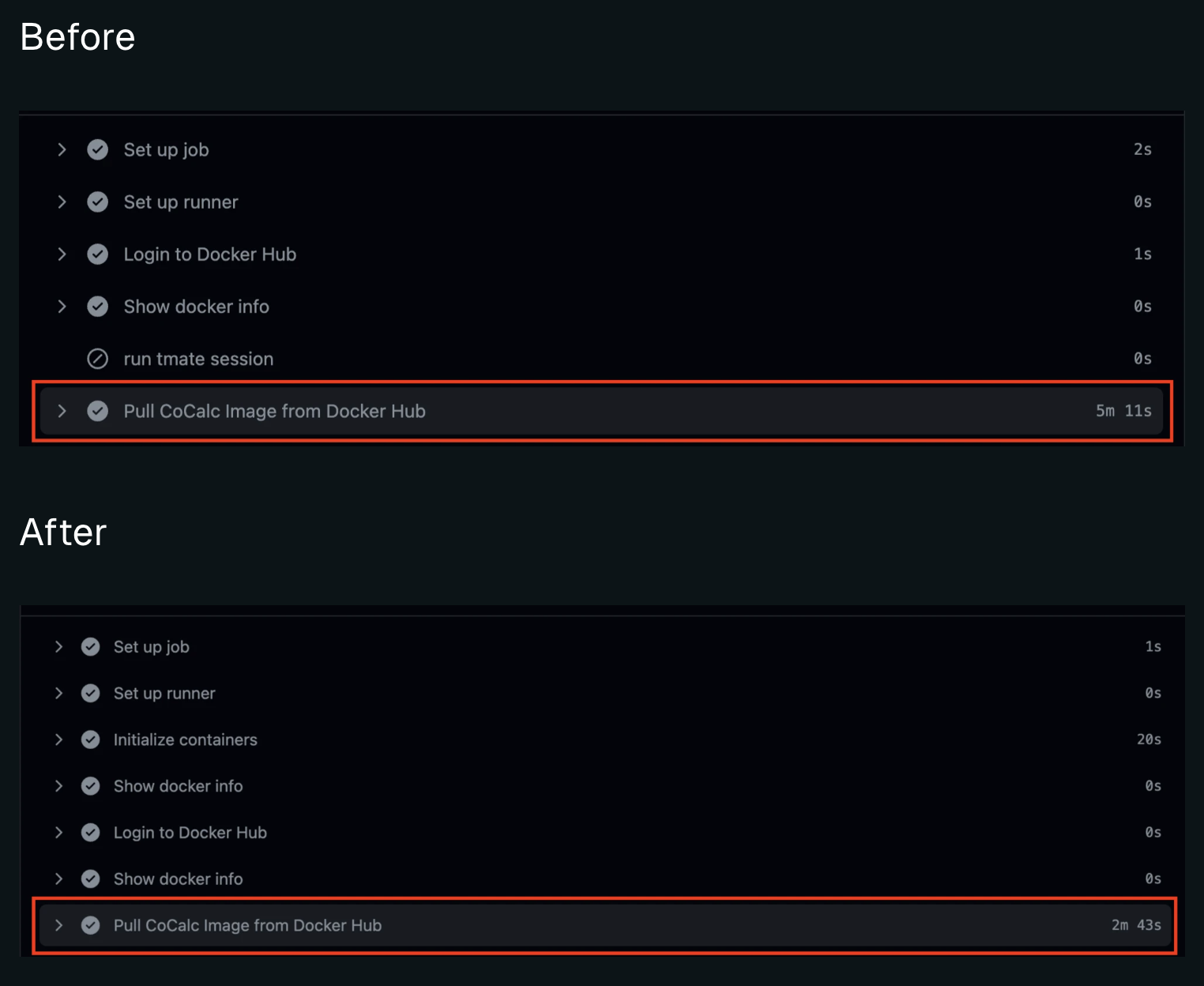
Blacksmith by default enables a local [Docker registry mirrors](https://docs.docker.com/docker-hub/mirror/) across our fleet, which act as “pull through” caches for public Docker images.
All Docker pulls on Blacksmith runners are routed through these mirrors, and they only need to hit Docker Hub once, to hydrate the cache.
This pull hydrates that particular image into the registry mirror so that subsequent pulls, across organizations, are served through
a node-local registry backed by our colocated cache store. This means common image pulls are substantially faster.
The Docker pull through mirror only caches public images. We do not cache private images.
 ## Preventing rate limit errors
The other main benefit is that CI jobs across an organization will now not be pulling as frequently from the Docker Hub and will
therefore not run into Docker Hub’s rate limits. Prior to the pull through caches, our customers would occasionally run into rate limit errors such as:
```
ERROR: toomanyrequests: Too Many Requests.
```
```
You have reached your pull rate limit. You may increase the limit by authenticating and upgrading: https://www.docker.com/increase-rate-limits.
```
This became even more common occurence after [Docker Hub's new rate limits were introduced on April 1st, 2025](https://www.blacksmith.sh/blog/you-have-5-days-before-the-new-dockerhub-limits-f-ck-you-over)
In case you continue to run into rate limit errors, please contact us at [hello@blacksmith.sh](mailto:hello@blacksmith.sh). As a temporary workaround, authenticating with Docker Hub will allow your workflows to pull images with a much higher rate limit.
To authenticate with Docker Hub, you can use the `docker login` command with your Docker Hub username and password. Here's an example of how to authenticate with Docker Hub:
```yml
- name: Login to Docker Hub
uses: docker/login-action@v2
with:
username: ${{ secrets.DOCKERHUB_USERNAME }}
password: ${{ secrets.DOCKERHUB_PASSWORD }}
```
## Authenticating service containers with Docker Hub credentials
If you're using [service containers](https://docs.github.com/en/actions/using-containerized-services/about-service-containers) in your workflows, you can authenticate with Docker Hub using the `credentials` option.
```yml
jobs:
build:
services:
redis:
# Docker Hub image
image: redis
ports:
- 6379:6379
credentials:
username: ${{ secrets.DOCKERHUB_USERNAME }}
password: ${{ secrets.DOCKERHUB_PASSWORD }}
```
# Analytics
Source: https://docs.blacksmith.sh/blacksmith-observability/dashboard
Fastest way to monitor your GitHub Actions performance and costs across your team
Blacksmith's CI Analytics dashboard provides a single view of your
CI pipeline's **performance**, **failure rate**, and **costs**.
All users within your organization who have access to GitHub can log
in at [app.blacksmith.sh](https://app.blacksmith.sh) to explore the dashboard.
## Jobs
The dashboard displays every job run across all your repositories.
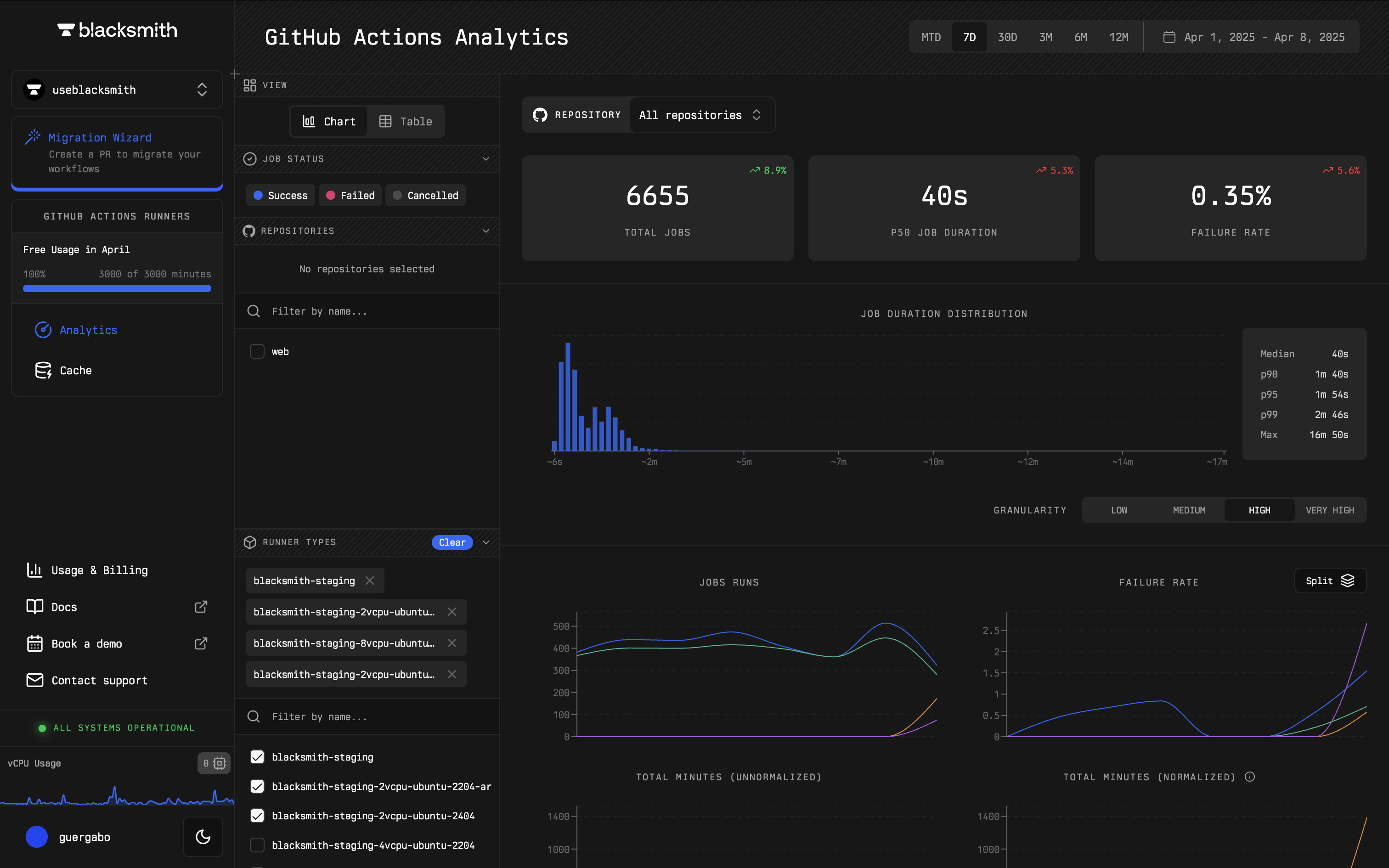
You can filter and analyze jobs by repository, runner size, job status, and more, enabling you to answer questions like:
* "What is the failure rate of my jobs?"
* "How long does this job typically take to complete?"
* "What is affecting the performance of my slowest job?"
For instance, Blacksmith's dashboard helps identify if a job is failing more often than usual. By filtering jobs by repository, you can assess failure rates and compare them to previous months.

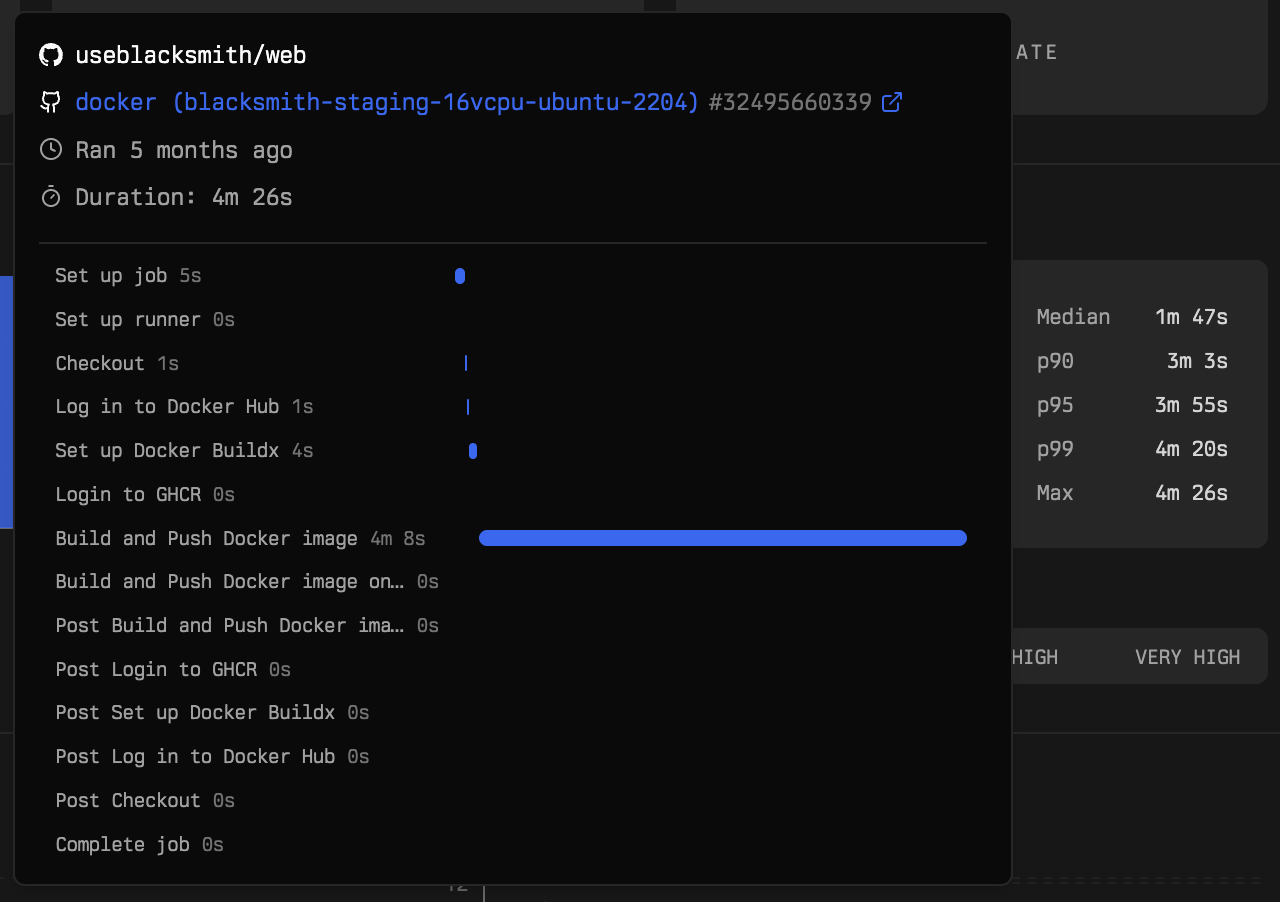
Blacksmith's dashboard helps identify what is affecting the performance of your slowest job. By hovering over the "p99" in the job duration distribution chart, you can see a breakdown of your slowest job's steps and the time taken for each step.
## Caches
The dashboard also provides insights into every cache entry across your repositories.
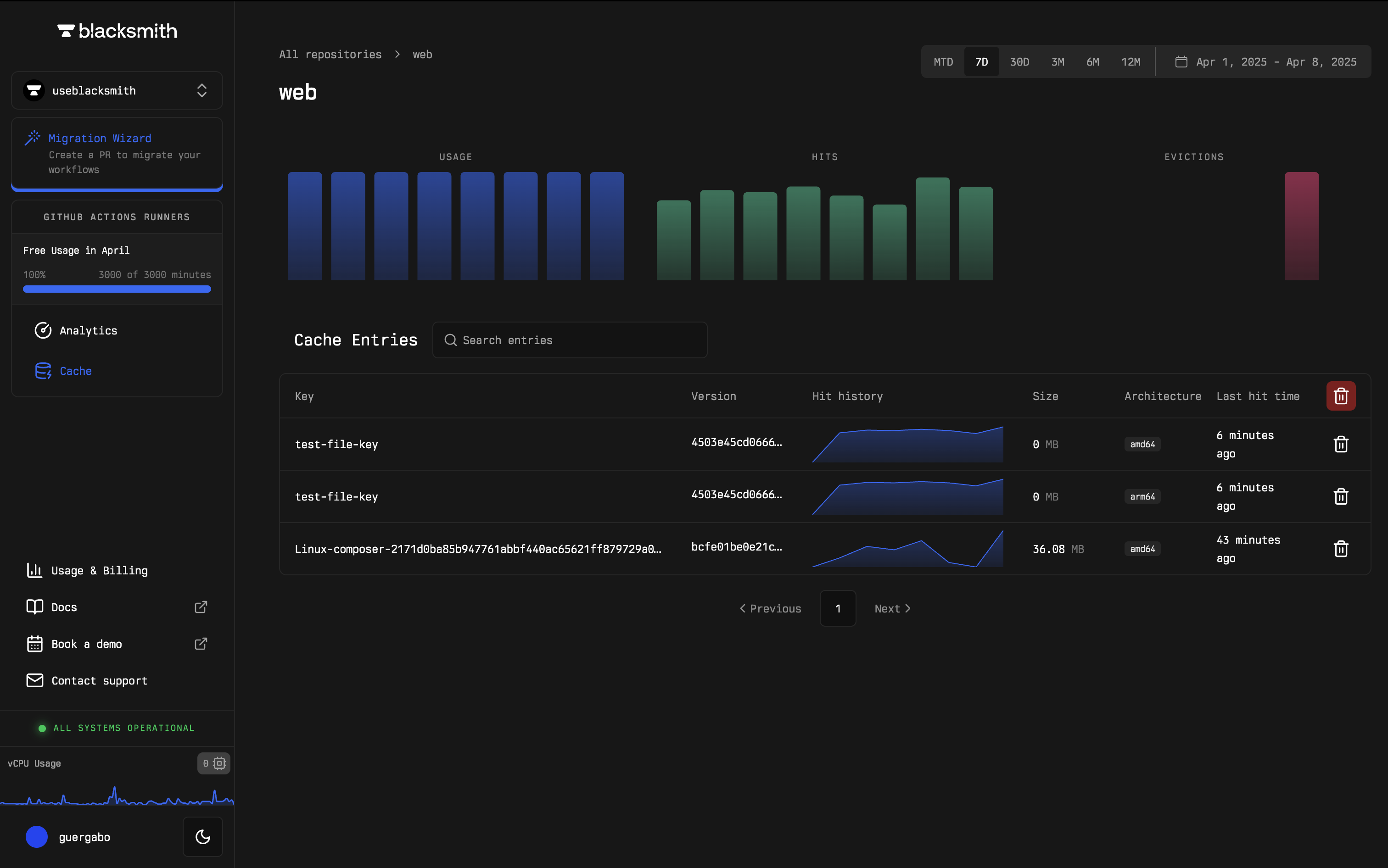
You can filter and analyze cache entries by repository, cache key, last hit time, and more, to answer questions like:
* "What is my total cache usage?"
* "What cache entries are currently available?"
* "How many recent cache hits have I had?"
Blacksmith makes it simple to track when a cache key was last hit. You can filter by repository to check the last hit time of cache entries, ensuring the cache key is functioning as expected.

## Costs
The dashboard also provides visibility into all Blacksmith usage and billing.
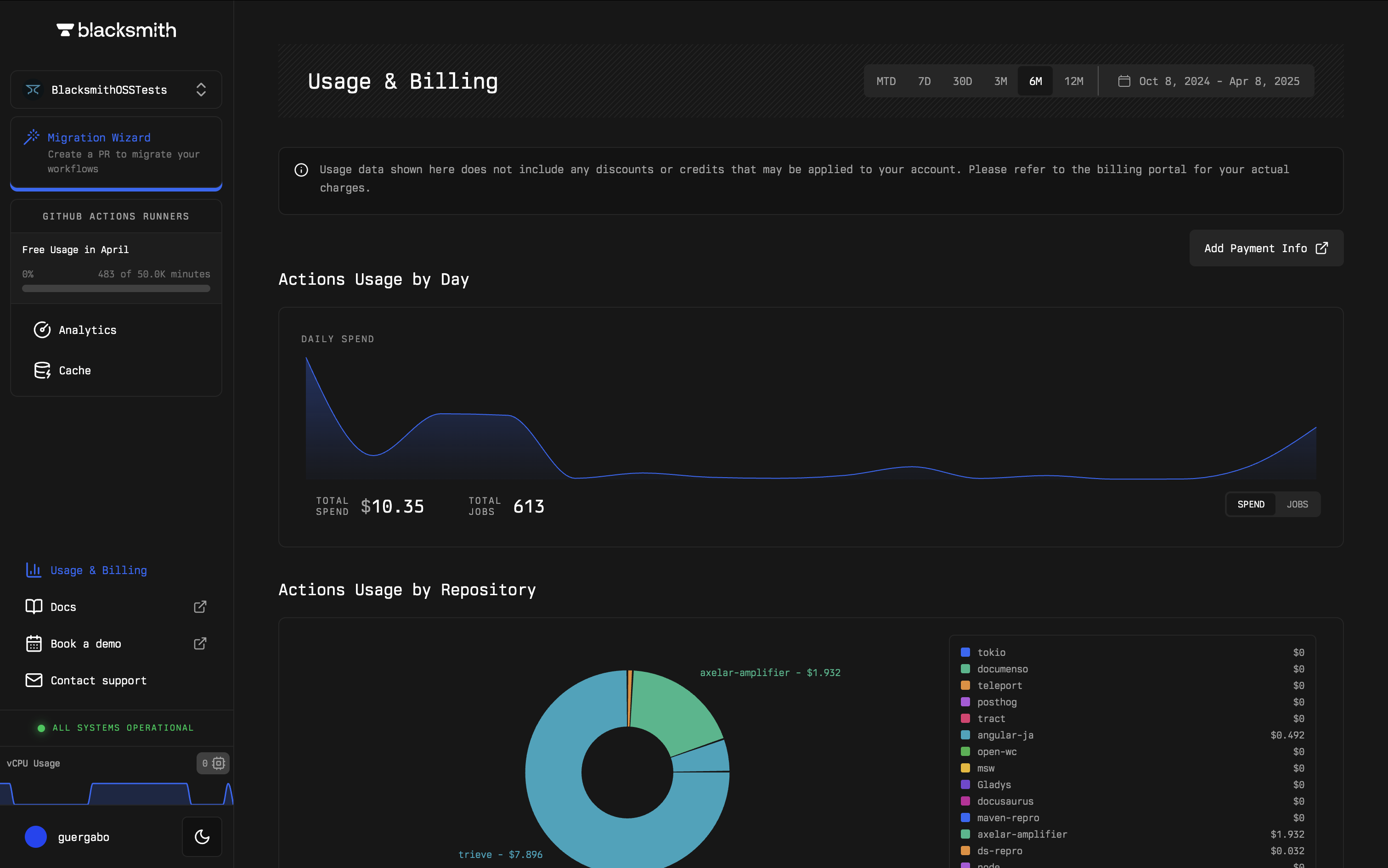
You can break down costs by repository to better understand CI expenses and ask questions such as:
* "How much more did I spend this month?"
* "Which repositories are consuming the most resources?"
* "How much am I spending on storage for caches?"
With Blacksmith you can track spending across repositories to identify how your teams and services are consuming compute and storage resources.
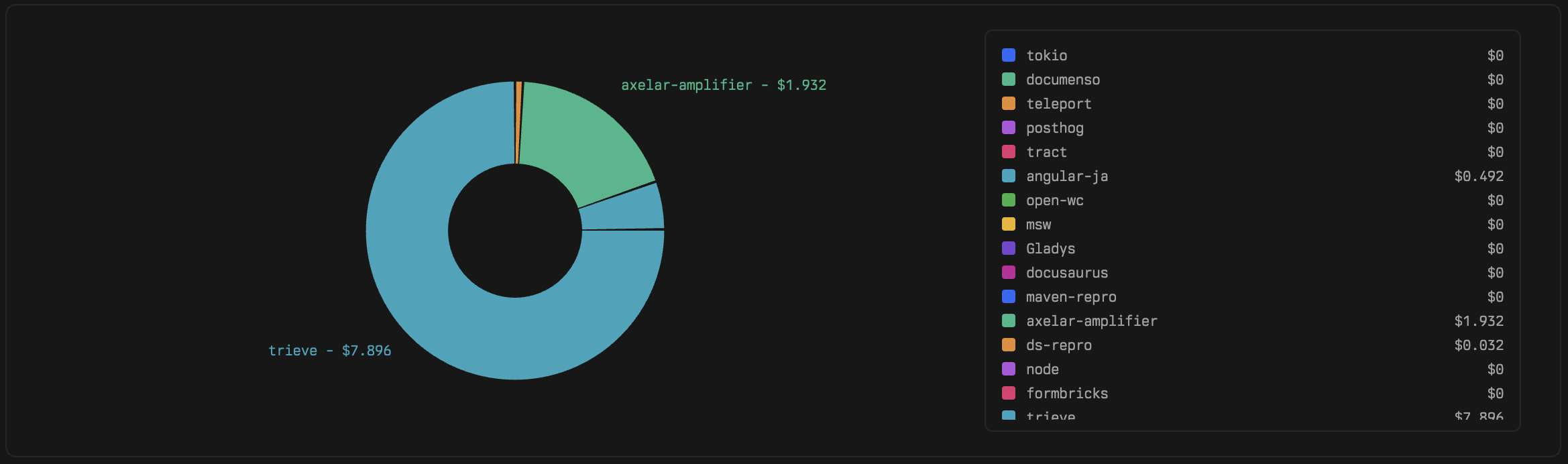
We are continuously working on additional visualizations. If there is something specific you'd like to see, feel free to reach out to us at [hello@blacksmith.sh](mailto:hello@blacksmith.sh).
***
# Run History
Source: https://docs.blacksmith.sh/blacksmith-observability/history
Fastest way to search, filter, and debug past CI runs on Blacksmith runners
## Preventing rate limit errors
The other main benefit is that CI jobs across an organization will now not be pulling as frequently from the Docker Hub and will
therefore not run into Docker Hub’s rate limits. Prior to the pull through caches, our customers would occasionally run into rate limit errors such as:
```
ERROR: toomanyrequests: Too Many Requests.
```
```
You have reached your pull rate limit. You may increase the limit by authenticating and upgrading: https://www.docker.com/increase-rate-limits.
```
This became even more common occurence after [Docker Hub's new rate limits were introduced on April 1st, 2025](https://www.blacksmith.sh/blog/you-have-5-days-before-the-new-dockerhub-limits-f-ck-you-over)
In case you continue to run into rate limit errors, please contact us at [hello@blacksmith.sh](mailto:hello@blacksmith.sh). As a temporary workaround, authenticating with Docker Hub will allow your workflows to pull images with a much higher rate limit.
To authenticate with Docker Hub, you can use the `docker login` command with your Docker Hub username and password. Here's an example of how to authenticate with Docker Hub:
```yml
- name: Login to Docker Hub
uses: docker/login-action@v2
with:
username: ${{ secrets.DOCKERHUB_USERNAME }}
password: ${{ secrets.DOCKERHUB_PASSWORD }}
```
## Authenticating service containers with Docker Hub credentials
If you're using [service containers](https://docs.github.com/en/actions/using-containerized-services/about-service-containers) in your workflows, you can authenticate with Docker Hub using the `credentials` option.
```yml
jobs:
build:
services:
redis:
# Docker Hub image
image: redis
ports:
- 6379:6379
credentials:
username: ${{ secrets.DOCKERHUB_USERNAME }}
password: ${{ secrets.DOCKERHUB_PASSWORD }}
```
# Analytics
Source: https://docs.blacksmith.sh/blacksmith-observability/dashboard
Fastest way to monitor your GitHub Actions performance and costs across your team
Blacksmith's CI Analytics dashboard provides a single view of your
CI pipeline's **performance**, **failure rate**, and **costs**.
All users within your organization who have access to GitHub can log
in at [app.blacksmith.sh](https://app.blacksmith.sh) to explore the dashboard.
## Jobs
The dashboard displays every job run across all your repositories.

You can filter and analyze jobs by repository, runner size, job status, and more, enabling you to answer questions like:
* "What is the failure rate of my jobs?"
* "How long does this job typically take to complete?"
* "What is affecting the performance of my slowest job?"
For instance, Blacksmith's dashboard helps identify if a job is failing more often than usual. By filtering jobs by repository, you can assess failure rates and compare them to previous months.

Blacksmith's dashboard helps identify what is affecting the performance of your slowest job. By hovering over the "p99" in the job duration distribution chart, you can see a breakdown of your slowest job's steps and the time taken for each step.

## Caches
The dashboard also provides insights into every cache entry across your repositories.

You can filter and analyze cache entries by repository, cache key, last hit time, and more, to answer questions like:
* "What is my total cache usage?"
* "What cache entries are currently available?"
* "How many recent cache hits have I had?"
Blacksmith makes it simple to track when a cache key was last hit. You can filter by repository to check the last hit time of cache entries, ensuring the cache key is functioning as expected.

## Costs
The dashboard also provides visibility into all Blacksmith usage and billing.

You can break down costs by repository to better understand CI expenses and ask questions such as:
* "How much more did I spend this month?"
* "Which repositories are consuming the most resources?"
* "How much am I spending on storage for caches?"
With Blacksmith you can track spending across repositories to identify how your teams and services are consuming compute and storage resources.

We are continuously working on additional visualizations. If there is something specific you'd like to see, feel free to reach out to us at [hello@blacksmith.sh](mailto:hello@blacksmith.sh).
***
# Run History
Source: https://docs.blacksmith.sh/blacksmith-observability/history
Fastest way to search, filter, and debug past CI runs on Blacksmith runners
 ## Overview
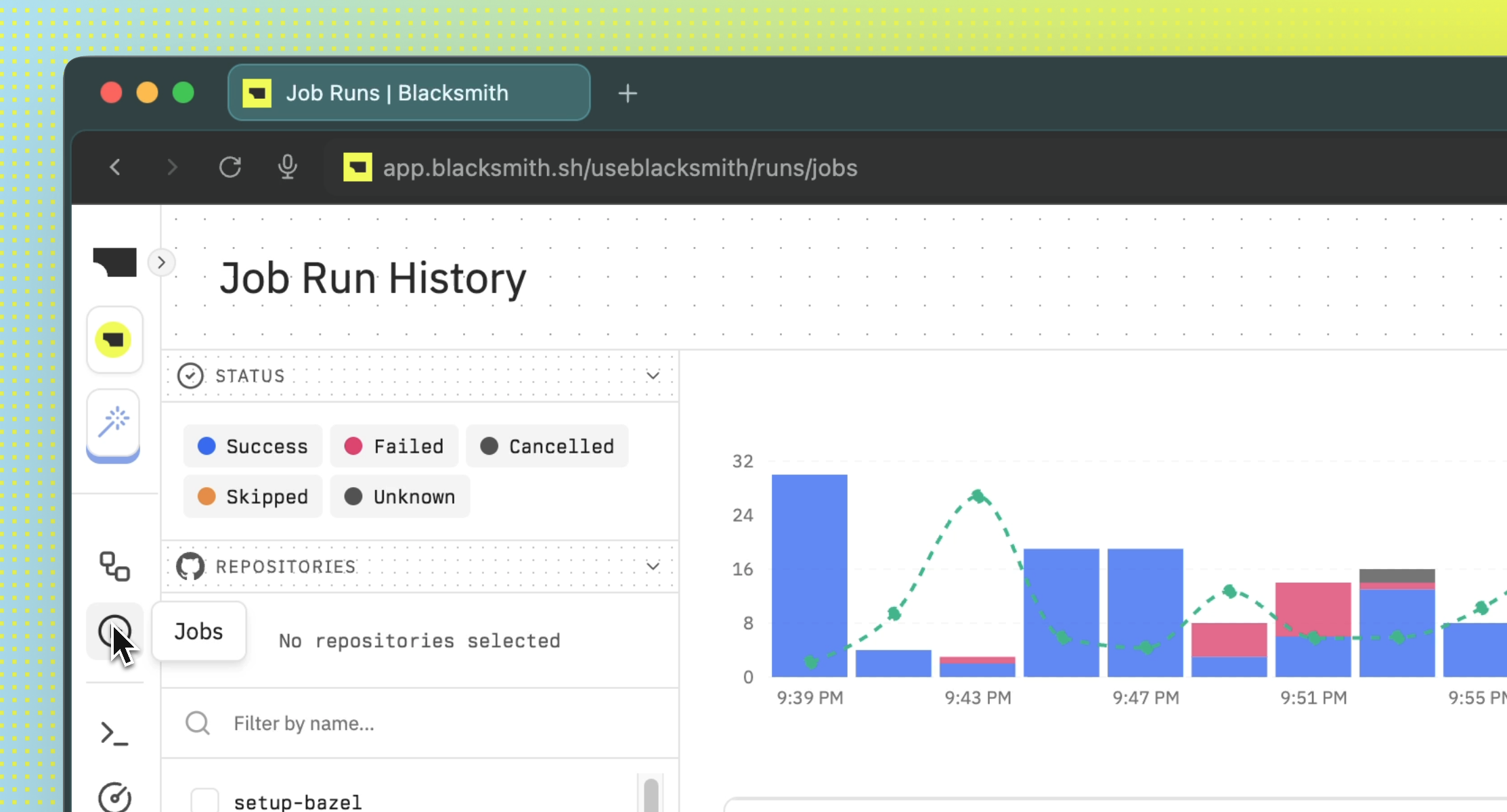
The Run History page is your central hub for searching, filtering, and debugging all CI workflows and jobs
across Blacksmith runners.
Whenever you’re tracking down who introduced a bug or checking whether a recent change caused a
failure, the Run History page helps you find answers quickly.
## Basics
Go to the **Workflow/Jobs** page and click on a job run to see its details. From there, you can
view logs, compare runs, review metrics, and more.
### Logs
## Overview
The Run History page is your central hub for searching, filtering, and debugging all CI workflows and jobs
across Blacksmith runners.
Whenever you’re tracking down who introduced a bug or checking whether a recent change caused a
failure, the Run History page helps you find answers quickly.
## Basics
Go to the **Workflow/Jobs** page and click on a job run to see its details. From there, you can
view logs, compare runs, review metrics, and more.
### Logs
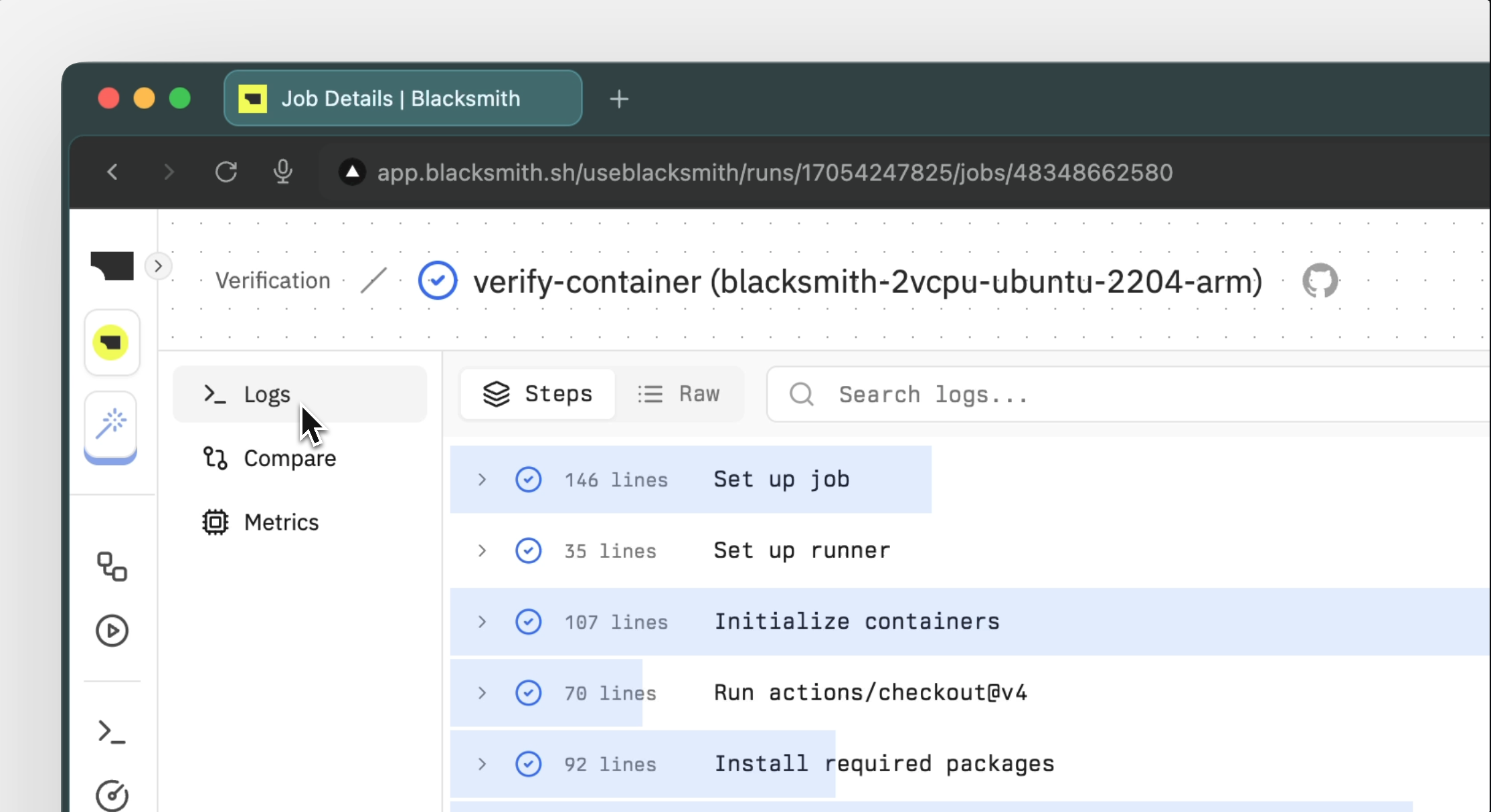 You can search and filter logs using the dedicated log search bar. This is a much snappier
experience than GitHub’s log search.
#### Global log search
You can search and filter logs using the dedicated log search bar. This is a much snappier
experience than GitHub’s log search.
#### Global log search
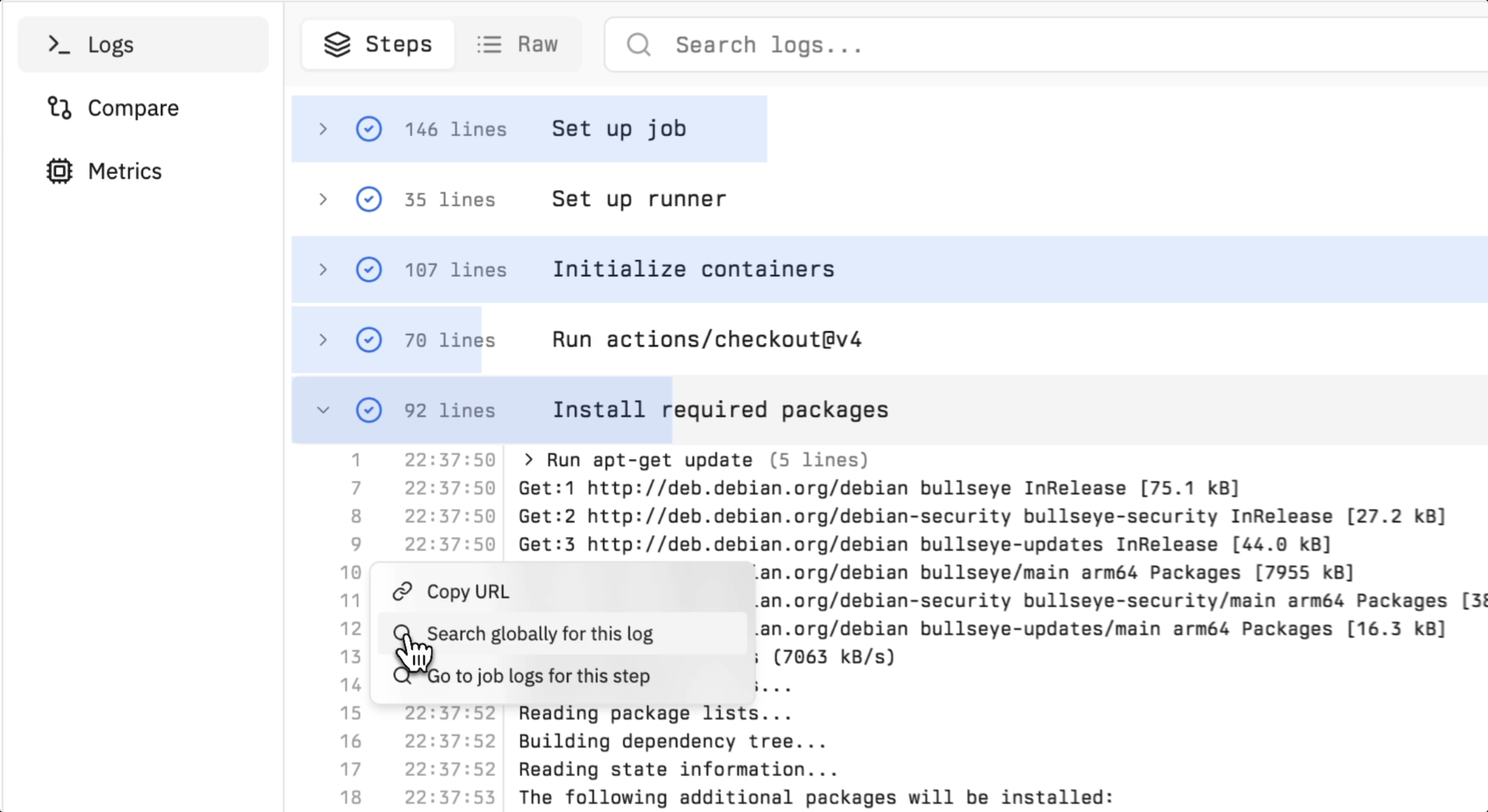 If you want to see when a particular log line (e.g., an error) first appeared, you can select
that log line and search for it globally across your entire CI pipeline.
To learn more about how this works, checkout our [logs page](/blacksmith-observability/logs).
### Compare
If you want to see when a particular log line (e.g., an error) first appeared, you can select
that log line and search for it globally across your entire CI pipeline.
To learn more about how this works, checkout our [logs page](/blacksmith-observability/logs).
### Compare
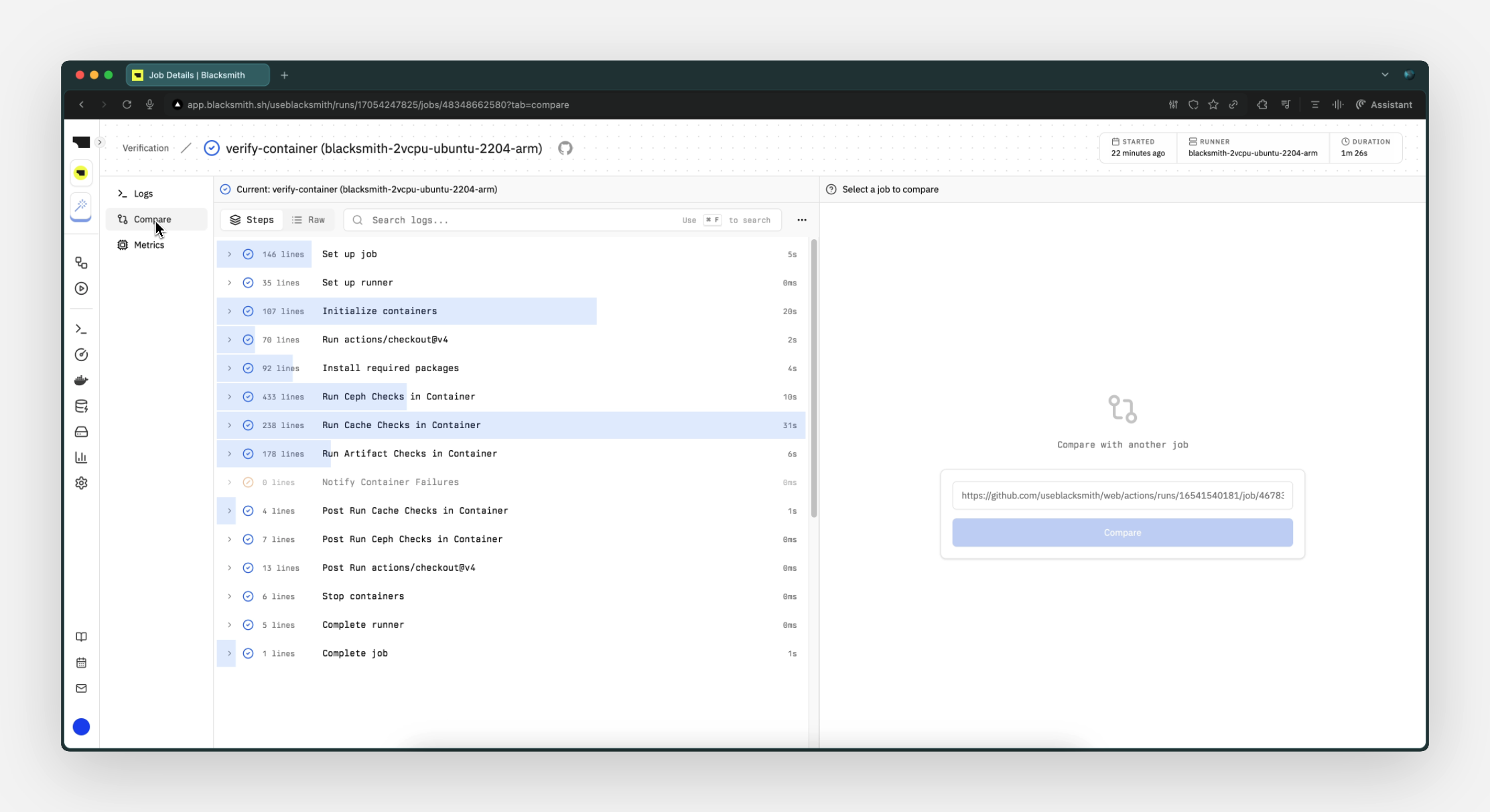 You can compare the logs of two job runs to identify what changed. All you need is the job URL
of the run you want to compare against.
### Metrics (Coming Soon)
You can compare the logs of two job runs to identify what changed. All you need is the job URL
of the run you want to compare against.
### Metrics (Coming Soon)
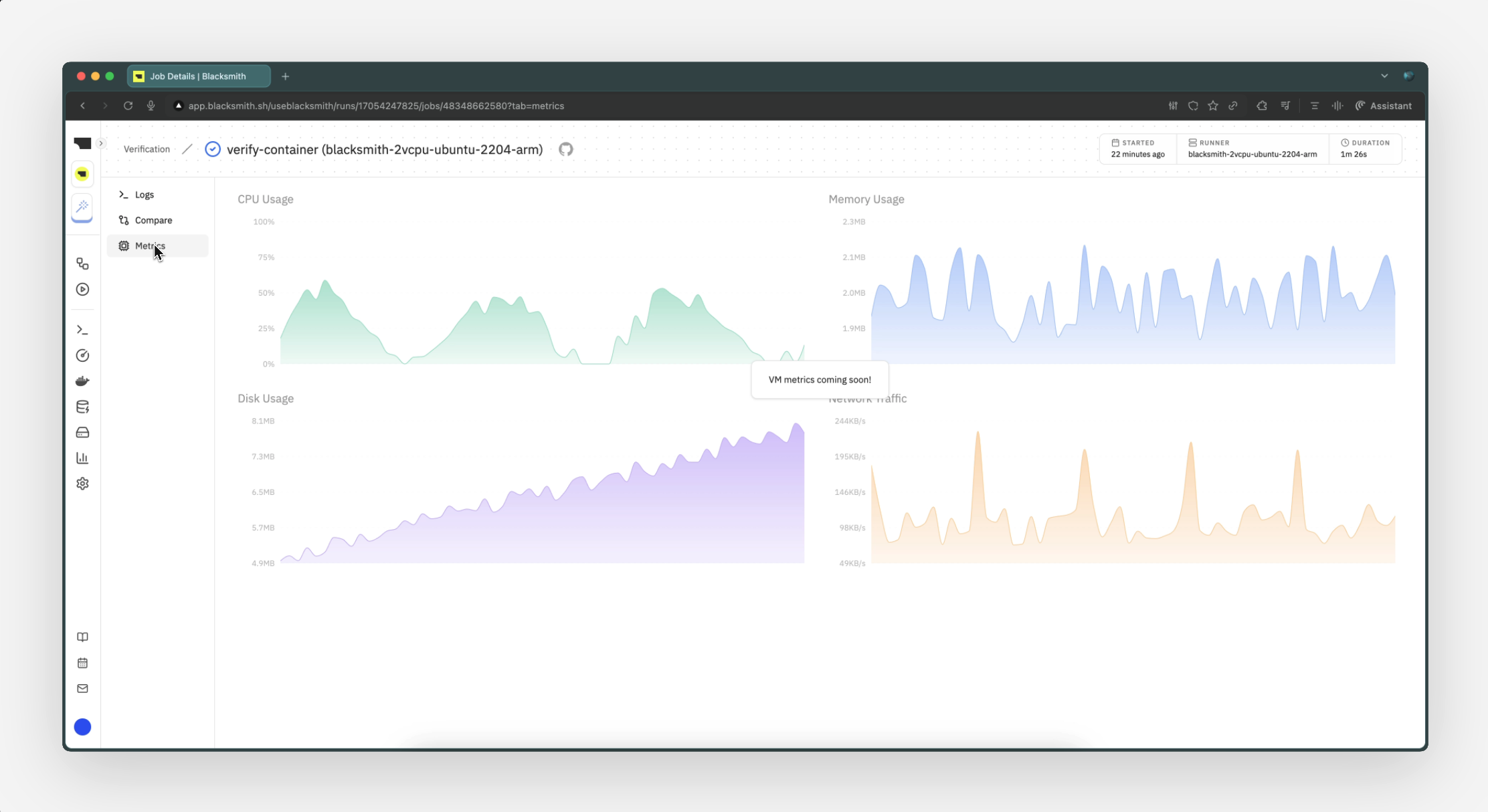 Metrics from the VM running the job will be available soon.
## FAQ
Only job runs on Blacksmith runners are visible in the Run History page.
# Logs
Source: https://docs.blacksmith.sh/blacksmith-observability/logs
Fastest way to search and filter logs across all CI jobs running on Blacksmith runners
Whether you're triaging a broken build in a pull request or digging into a flaky test that only happens on main, logs are now a much better experience in GitHub Actions. You'll be able to zoom in locally or investigate patterns globally across all your CI runs.
## Query Syntax Guide
Let's break down the query syntax:
```plaintext
branch:main level:error,warn failed -"econn refused"
```
### Property Filters
You can search and filter your logs using the following criteria:
| **Filter** | **Description** |
| --------------- | --------------------------------------------------------------------- |
| `run_id:*` | Filter by workflow run instances (each run may contain multiple jobs) |
| `run_attempt:*` | Filter by the attempt number of a given workflow run |
| `workflow:*` | Filter by GitHub workflow name |
| `pr:*` | Filter by pull request number |
| `branch:*` | Filter by Git branch associated with the run |
| `repo:*` | Filter by repository name |
| `job_id:*` | Filter by specific job IDs |
| `job_name:*` | Filter by job names |
| `step_id:*` | Filter by specific step IDs |
| `step_name:*` | Filter by workflow step names |
| `user:*` | Filter by the user who triggered the workflow |
| `level:*` | Filter by severity (`info`, `warn`, `debug`, `error`) |
In this example, we are filtering for logs from the `main` branch and only showing logs with severity `error` or `warn`:
```plaintext
branch:main level:error,warn
```
### Substring Search
You can search for text across your logs using the log search bar. For multi-word phrases, use quotes. In this example, we are searching for logs containing the phrase "failed":
```plaintext
failed
```
### Exclude Matches
You can exclude matches by prefixing a search term with `-`. In this example, we are excluding logs containing the phrase "econn refused":
```plaintext
-"econn refused"
```
### Escaping Special Characters
* **Quotes**: Escape with backslash: `\"`
* **Backslashes**: Escape with backslash: `\\`
* **Keywords**: Wrap AND/OR in quotes to search literally: `"AND"` `"OR"`
# SSH Access
Source: https://docs.blacksmith.sh/blacksmith-observability/ssh-access
Fastest way to debug running jobs and inspect VM state
SSH into running jobs to debug issues, inspect state, or troubleshoot your workflows in real-time. Access is automatically granted using the SSH keys from your GitHub account.
**Zero configuration required.**
## How it works
When a job starts on a Blacksmith runner, SSH access is automatically enabled. The runner authorizes connections using the SSH keys you've added to your GitHub account, ensuring secure access without any additional setup.
Each runner exposes a unique SSH port that's displayed in your workflow logs at the start of every job.
## Connecting to a runner
At the beginning of each job, you'll see connection information in the `Setup runner` step:
```bash
ssh -p 12345 runner@...
```
Simply copy and run the command in your terminal to connect using your GitHub SSH key.
### Simplify connections with SSH config
Add this to your `~/.ssh/config` file to streamline connections:
```
Host *.vm.blacksmith.sh
StrictHostKeyChecking no
UserKnownHostsFile /dev/null
```
With this configuration, you can connect using just:
```bash
ssh -p 12345 runner@...
```
The `StrictHostKeyChecking no` and `UserKnownHostsFile /dev/null` settings
skip host key verification since runner VMs are ephemeral and get new host
keys each time. This also avoids cluttering your known\_hosts file with
temporary VM fingerprints.
## Common use cases
#### Debug failing tests
Connect to inspect test artifacts, environment variables, or running processes when tests fail unexpectedly.
#### Verify build outputs
Check generated files, build artifacts, or compilation outputs directly on the runner.
#### Inspect environment state
Examine installed dependencies, system configurations, or runtime environments during workflow execution.
#### Troubleshoot network issues
Test connectivity, DNS resolution, or API access from within the runner environment.
## FAQ
**How do I keep a job running for debugging?**
Add a sleep step that runs on failure to give yourself time to connect and debug:
```yaml
- name: Keep job alive on failure for debugging
if: failure()
run: |
echo "Job failed. Keeping VM alive for 30 minutes for debugging..."
echo "SSH connection info is available in the Setup runner step above"
sleep 1800
```
We don't recommend using the `action-tmate` step as it's unnecessary with
Blacksmith's built-in SSH support, and adds complexity to your workflow.
**Why am I getting "Could not resolve hostname"?**
This error means the job has already finished. SSH access is only available while the job is actively running. Add a sleep step (see above) to keep the job alive longer.
**Why am I getting "Permission denied"?**
Verify that:
* Your SSH key is properly added to your GitHub account
* Your SSH key is configured correctly for GitHub
* You're the person who triggered the job (only the job sender can SSH in)
**Can multiple people SSH into the same runner?**
No, only the GitHub user who triggered the job can SSH into the runner.
We're planning to add support for configuring additional SSH keys on demand through environment variables in your jobs. This will provide a secure way to grant access to team members when needed. Stay tuned for updates!
**How long can I stay connected?**
You can stay connected as long as the job is running. If you're still connected when the job completes, we provide a grace period of approximately 5 minutes before terminating the connection.
**Is there any additional cost for SSH access?**
No, SSH access is automatically enabled for all Blacksmith runners at no additional cost. It's included as a standard feature.
## Support
Need help with SSH access? Let us know by opening a [support ticket](https://app.blacksmith.sh/?support=open).
# Refer
Source: https://docs.blacksmith.sh/blacksmith-referral/refer
Fastest way to get another 3000 free CPU minutes, no strings attached.
Capture the performance boost you experience with Blacksmith. This can be as simple as a screenshot or shout-out comparing the runtime of your workflows before and after Blacksmith.
Share it with the world. Make sure to tag Blacksmith so we can see your referral. If your GitHub username is not visible on your post, please DM us to be able to credit you.
Viewers may experience FOMO.
Once approved (within 2 business days), you'll have 3000 free CPU minutes added to your account, no strings attached. This can be done max 1 time per month and the minutes do roll over.
Usage data shown on your dashboard does not include any discounts or credits that may be applied to your account. Please refer to the billing portal for your actual charges.
If you face any issues or questions, reach out to us at [support@blacksmith.sh](mailto:support@blacksmith.sh).
# Runners
Source: https://docs.blacksmith.sh/blacksmith-runners/overview
Blacksmith runners are 2x faster and costs 75% less than GitHub-hosted runners
```yml Diff Example icon="code" lines
jobs:
build:
runs-on: ubuntu-latest # [!code --]
runs-on: blacksmith-2vcpu-ubuntu-2404 # [!code ++]
```
## Overview
* **We're substantially faster:** We orchestrate jobs over our fleet of modern gaming CPUs which have significantly higher single-thread performance compared to their server counterparts. Blacksmith is twice as fast as GitHub's decade-old server hardware for most CI jobs. Learn more about our runners [here](/blacksmith-runners/overview#runner-tags).
* **We're able to provision runners instantly:** Blacksmith runs jobs in ephemeral Firecracker microVMs which boot up in less than 3 seconds, regardless of runner size and number of concurrent jobs. We maintain our own homogenous pool of compute, so your CI jobs don't compete with other on-demand workloads like they would on a hyperscaler like AWS.
* **We're less than half the cost:** Our runners are exactly half the cost of GitHub's per minute. Since Blacksmith runners are also faster, you will consume fewer minutes than on GitHub.
Discover your potential savings with Blacksmith [here](https://www.blacksmith.sh/pricing).
* **We're a drop-in replacement:** Blacksmith runners boot off of the same image(s) as GitHub's runners and have the exact same environment. Transitioning to Blacksmith is as simple as changing a single line in your workflow file.
* **We co-locate your cache right next to your runners:** All official GitHub and popular third-party cache actions transparently interact with our co-located cache which quadruples cache throughput to 400MB/s,
significantly outperforming GitHub's cache backend. Read more about it [here](/blacksmith-caching/dependencies-actions).
* **We offer unlimited concurrency:** Blacksmith runners are not subject to the same concurrency limits as GitHub-hosted runners. You can run as many jobs as you need, without the risk of being queued.
## Basics
To switch to a Blacksmith runner, just
replace the current tag with the
appropriate Blacksmith runner tag.
### Runner Tags
| Instance Type | Compute | Memory | Storage |
| :------------------------------ | :------ | :----- | :------ |
| `blacksmith-2vcpu-ubuntu-2404` | 2 vCPU | 8 GB | 80 GB |
| `blacksmith-4vcpu-ubuntu-2404` | 4 vCPU | 16 GB | 80 GB |
| `blacksmith-8vcpu-ubuntu-2404` | 8 vCPU | 32 GB | 160 GB |
| `blacksmith-16vcpu-ubuntu-2404` | 16 vCPU | 64 GB | 750 GB |
| `blacksmith-32vcpu-ubuntu-2404` | 32 vCPU | 128 GB | 1.5 TB |
| Instance Type | Compute | Memory | Storage |
| :------------------------------ | :------ | :----- | :------ |
| `blacksmith-2vcpu-ubuntu-2204` | 2 vCPU | 8 GB | 80 GB |
| `blacksmith-4vcpu-ubuntu-2204` | 4 vCPU | 16 GB | 80 GB |
| `blacksmith-8vcpu-ubuntu-2204` | 8 vCPU | 32 GB | 160 GB |
| `blacksmith-16vcpu-ubuntu-2204` | 16 vCPU | 64 GB | 750 GB |
| `blacksmith-32vcpu-ubuntu-2204` | 32 vCPU | 128 GB | 1.5 TB |
#### ARM Runners
| Instance Type | Compute | Memory | Storage |
| :---------------------------------- | :------ | :----- | :------ |
| `blacksmith-2vcpu-ubuntu-2404-arm` | 2 vCPU | 6 GB | 75 GB |
| `blacksmith-4vcpu-ubuntu-2404-arm` | 4 vCPU | 12 GB | 75 GB |
| `blacksmith-8vcpu-ubuntu-2404-arm` | 8 vCPU | 24 GB | 160 GB |
| `blacksmith-16vcpu-ubuntu-2404-arm` | 16 vCPU | 48 GB | 750 GB |
| `blacksmith-32vcpu-ubuntu-2404-arm` | 32 vCPU | 96 GB | 1.5 TB |
| Instance Type | Compute | Memory | Storage |
| :---------------------------------- | :------ | :----- | :------ |
| `blacksmith-2vcpu-ubuntu-2204-arm` | 2 vCPU | 6 GB | 75 GB |
| `blacksmith-4vcpu-ubuntu-2204-arm` | 4 vCPU | 12 GB | 75 GB |
| `blacksmith-8vcpu-ubuntu-2204-arm` | 8 vCPU | 24 GB | 160 GB |
| `blacksmith-16vcpu-ubuntu-2204-arm` | 16 vCPU | 48 GB | 750 GB |
| `blacksmith-32vcpu-ubuntu-2204-arm` | 32 vCPU | 96 GB | 1.5 TB |
### Free Upgrades
Blacksmith maintains a fleet of bare metal gaming CPUs that these runners are orchestrated over. When our fleet has substantial spare capacity, our system automatically bumps a runner to the next tier, at no additional cost to the user. Example: A `blacksmith-4vcpu-ubuntu-2204` runner may get bumped to `blacksmith-8vcpu-ubuntu-2204` for no additional cost.
### Pre-installed Packages
#### x64
Blacksmith runners are pre-installed with the same dependencies supported by [GitHub's official runner image](https://github.com/actions/runner-images/blob/main/images/ubuntu/Ubuntu2204-Readme.md).
#### ARM
Unlike x64, GitHub has not published an official Ubuntu 22.04 image for ARM runners. As a result, Blacksmith ARM runners might not have the same compatibility as our x64 runners. If you have any specific requirements, please reach out to us at [hello@blacksmith.sh](mailto:hello@blacksmith.sh).
## FAQ
Blacksmith provides `3000 x64 2vCPU minutes` for free per month per organization. These minutes can be used on runners with higher vCPU counts, but the minutes will be consumed at a higher rate proportional to the vCPU count.
For instance, a job taking 10 minutes on a 4vCPU runner would consume the equivalent of 20 2vCPU minutes and a job taking 10 minutes on an 8vCPU runner would consume the equivalent of 40 2vCPU minutes.
Note that ARM runners may also utilize the free minutes. For billing purposes, `1 ARM vCPU minute = 0.625 x64 2vCPU minutes`.
The same conversion rate applies proportionally to runners with higher vCPU counts. For example, a job running for 10 minutes on an ARM 4vCPU runner would consume `12.5 x64 2vCPU minutes`.
Blacksmith does not impose any concurrency limits i.e., limits on how many vCPUs or jobs that can be run simultaneously.
Our mission is to offer a truly serverless experience for your CI.
No. A common complaint from customers migrating from GitHub-hosted runners or self-hosted setups are the long wait times for a job to be picked up by larger runners (8vCPU+), especially during peak hours.
All Blacksmith runner configurations (2, 4, 8, 16, and 32 vCPU) are instantly available on demand.
We maintain our own homogenous pool of compute, so your CI jobs don't compete with other on-demand workloads like they would on hyperscalers like AWS, GCP or Azure.
This helps our customers aggressively shard their test suites and deploy pipelines without worrying about queued jobs due to a lack of available runners.
# Static IP
Source: https://docs.blacksmith.sh/blacksmith-runners/static-ip
Use Blacksmith runners with a dedicated static IP
## Static IP
CI pipelines often interact with external services like databases and APIs that block requests from unknown IPs.
We offer static IPs for Blacksmith runners. Whitelisting these IPs in your external services would allow Blacksmith runners to access them securely.
## How it Works
On purchasing a static IP, all of the organization's runners will use a dedicated, encrypted [WireGuard](https://www.wireguard.com/) tunnel to route network packets through a NAT gateway with a static IP.
The dedicated tunnel per NAT gateway ensures complete isolation of network traffic for that organization from other Blacksmith subnets.
To enable static IPs for your organization, please contact us through [our support portal](https://app.blacksmith.sh/?support=open). Static IPs are available for a fixed monthly fee of \$100 per IP.
# Changelog
Source: https://docs.blacksmith.sh/changelog
Product updates and announcements
Features
* \[Observability] New job run history page
Fixes
* \[Docker layer caching] Stabilized the storage cluster, improving Docker layer caching reliability
# Quickstart
Source: https://docs.blacksmith.sh/introduction/quickstart
Try the fastest way to run your GitHub Actions in under 5 minutes
Start by going to [app.blacksmith.sh](https://app.blacksmith.sh) and follow the steps to grant Blacksmith the necessary permissions to execute your GitHub Action jobs on Blacksmith's infrastructure.
Blacksmith is limited to GitHub organizations and not available for personal repositories.
Metrics from the VM running the job will be available soon.
## FAQ
Only job runs on Blacksmith runners are visible in the Run History page.
# Logs
Source: https://docs.blacksmith.sh/blacksmith-observability/logs
Fastest way to search and filter logs across all CI jobs running on Blacksmith runners
Whether you're triaging a broken build in a pull request or digging into a flaky test that only happens on main, logs are now a much better experience in GitHub Actions. You'll be able to zoom in locally or investigate patterns globally across all your CI runs.
## Query Syntax Guide
Let's break down the query syntax:
```plaintext
branch:main level:error,warn failed -"econn refused"
```
### Property Filters
You can search and filter your logs using the following criteria:
| **Filter** | **Description** |
| --------------- | --------------------------------------------------------------------- |
| `run_id:*` | Filter by workflow run instances (each run may contain multiple jobs) |
| `run_attempt:*` | Filter by the attempt number of a given workflow run |
| `workflow:*` | Filter by GitHub workflow name |
| `pr:*` | Filter by pull request number |
| `branch:*` | Filter by Git branch associated with the run |
| `repo:*` | Filter by repository name |
| `job_id:*` | Filter by specific job IDs |
| `job_name:*` | Filter by job names |
| `step_id:*` | Filter by specific step IDs |
| `step_name:*` | Filter by workflow step names |
| `user:*` | Filter by the user who triggered the workflow |
| `level:*` | Filter by severity (`info`, `warn`, `debug`, `error`) |
In this example, we are filtering for logs from the `main` branch and only showing logs with severity `error` or `warn`:
```plaintext
branch:main level:error,warn
```
### Substring Search
You can search for text across your logs using the log search bar. For multi-word phrases, use quotes. In this example, we are searching for logs containing the phrase "failed":
```plaintext
failed
```
### Exclude Matches
You can exclude matches by prefixing a search term with `-`. In this example, we are excluding logs containing the phrase "econn refused":
```plaintext
-"econn refused"
```
### Escaping Special Characters
* **Quotes**: Escape with backslash: `\"`
* **Backslashes**: Escape with backslash: `\\`
* **Keywords**: Wrap AND/OR in quotes to search literally: `"AND"` `"OR"`
# SSH Access
Source: https://docs.blacksmith.sh/blacksmith-observability/ssh-access
Fastest way to debug running jobs and inspect VM state
SSH into running jobs to debug issues, inspect state, or troubleshoot your workflows in real-time. Access is automatically granted using the SSH keys from your GitHub account.
**Zero configuration required.**
## How it works
When a job starts on a Blacksmith runner, SSH access is automatically enabled. The runner authorizes connections using the SSH keys you've added to your GitHub account, ensuring secure access without any additional setup.
Each runner exposes a unique SSH port that's displayed in your workflow logs at the start of every job.
## Connecting to a runner
At the beginning of each job, you'll see connection information in the `Setup runner` step:
```bash
ssh -p 12345 runner@...
```
Simply copy and run the command in your terminal to connect using your GitHub SSH key.
### Simplify connections with SSH config
Add this to your `~/.ssh/config` file to streamline connections:
```
Host *.vm.blacksmith.sh
StrictHostKeyChecking no
UserKnownHostsFile /dev/null
```
With this configuration, you can connect using just:
```bash
ssh -p 12345 runner@...
```
The `StrictHostKeyChecking no` and `UserKnownHostsFile /dev/null` settings
skip host key verification since runner VMs are ephemeral and get new host
keys each time. This also avoids cluttering your known\_hosts file with
temporary VM fingerprints.
## Common use cases
#### Debug failing tests
Connect to inspect test artifacts, environment variables, or running processes when tests fail unexpectedly.
#### Verify build outputs
Check generated files, build artifacts, or compilation outputs directly on the runner.
#### Inspect environment state
Examine installed dependencies, system configurations, or runtime environments during workflow execution.
#### Troubleshoot network issues
Test connectivity, DNS resolution, or API access from within the runner environment.
## FAQ
**How do I keep a job running for debugging?**
Add a sleep step that runs on failure to give yourself time to connect and debug:
```yaml
- name: Keep job alive on failure for debugging
if: failure()
run: |
echo "Job failed. Keeping VM alive for 30 minutes for debugging..."
echo "SSH connection info is available in the Setup runner step above"
sleep 1800
```
We don't recommend using the `action-tmate` step as it's unnecessary with
Blacksmith's built-in SSH support, and adds complexity to your workflow.
**Why am I getting "Could not resolve hostname"?**
This error means the job has already finished. SSH access is only available while the job is actively running. Add a sleep step (see above) to keep the job alive longer.
**Why am I getting "Permission denied"?**
Verify that:
* Your SSH key is properly added to your GitHub account
* Your SSH key is configured correctly for GitHub
* You're the person who triggered the job (only the job sender can SSH in)
**Can multiple people SSH into the same runner?**
No, only the GitHub user who triggered the job can SSH into the runner.
We're planning to add support for configuring additional SSH keys on demand through environment variables in your jobs. This will provide a secure way to grant access to team members when needed. Stay tuned for updates!
**How long can I stay connected?**
You can stay connected as long as the job is running. If you're still connected when the job completes, we provide a grace period of approximately 5 minutes before terminating the connection.
**Is there any additional cost for SSH access?**
No, SSH access is automatically enabled for all Blacksmith runners at no additional cost. It's included as a standard feature.
## Support
Need help with SSH access? Let us know by opening a [support ticket](https://app.blacksmith.sh/?support=open).
# Refer
Source: https://docs.blacksmith.sh/blacksmith-referral/refer
Fastest way to get another 3000 free CPU minutes, no strings attached.
Capture the performance boost you experience with Blacksmith. This can be as simple as a screenshot or shout-out comparing the runtime of your workflows before and after Blacksmith.
Share it with the world. Make sure to tag Blacksmith so we can see your referral. If your GitHub username is not visible on your post, please DM us to be able to credit you.
Viewers may experience FOMO.
Once approved (within 2 business days), you'll have 3000 free CPU minutes added to your account, no strings attached. This can be done max 1 time per month and the minutes do roll over.
Usage data shown on your dashboard does not include any discounts or credits that may be applied to your account. Please refer to the billing portal for your actual charges.
If you face any issues or questions, reach out to us at [support@blacksmith.sh](mailto:support@blacksmith.sh).
# Runners
Source: https://docs.blacksmith.sh/blacksmith-runners/overview
Blacksmith runners are 2x faster and costs 75% less than GitHub-hosted runners
```yml Diff Example icon="code" lines
jobs:
build:
runs-on: ubuntu-latest # [!code --]
runs-on: blacksmith-2vcpu-ubuntu-2404 # [!code ++]
```
## Overview
* **We're substantially faster:** We orchestrate jobs over our fleet of modern gaming CPUs which have significantly higher single-thread performance compared to their server counterparts. Blacksmith is twice as fast as GitHub's decade-old server hardware for most CI jobs. Learn more about our runners [here](/blacksmith-runners/overview#runner-tags).
* **We're able to provision runners instantly:** Blacksmith runs jobs in ephemeral Firecracker microVMs which boot up in less than 3 seconds, regardless of runner size and number of concurrent jobs. We maintain our own homogenous pool of compute, so your CI jobs don't compete with other on-demand workloads like they would on a hyperscaler like AWS.
* **We're less than half the cost:** Our runners are exactly half the cost of GitHub's per minute. Since Blacksmith runners are also faster, you will consume fewer minutes than on GitHub.
Discover your potential savings with Blacksmith [here](https://www.blacksmith.sh/pricing).
* **We're a drop-in replacement:** Blacksmith runners boot off of the same image(s) as GitHub's runners and have the exact same environment. Transitioning to Blacksmith is as simple as changing a single line in your workflow file.
* **We co-locate your cache right next to your runners:** All official GitHub and popular third-party cache actions transparently interact with our co-located cache which quadruples cache throughput to 400MB/s,
significantly outperforming GitHub's cache backend. Read more about it [here](/blacksmith-caching/dependencies-actions).
* **We offer unlimited concurrency:** Blacksmith runners are not subject to the same concurrency limits as GitHub-hosted runners. You can run as many jobs as you need, without the risk of being queued.
## Basics
To switch to a Blacksmith runner, just
replace the current tag with the
appropriate Blacksmith runner tag.
### Runner Tags
| Instance Type | Compute | Memory | Storage |
| :------------------------------ | :------ | :----- | :------ |
| `blacksmith-2vcpu-ubuntu-2404` | 2 vCPU | 8 GB | 80 GB |
| `blacksmith-4vcpu-ubuntu-2404` | 4 vCPU | 16 GB | 80 GB |
| `blacksmith-8vcpu-ubuntu-2404` | 8 vCPU | 32 GB | 160 GB |
| `blacksmith-16vcpu-ubuntu-2404` | 16 vCPU | 64 GB | 750 GB |
| `blacksmith-32vcpu-ubuntu-2404` | 32 vCPU | 128 GB | 1.5 TB |
| Instance Type | Compute | Memory | Storage |
| :------------------------------ | :------ | :----- | :------ |
| `blacksmith-2vcpu-ubuntu-2204` | 2 vCPU | 8 GB | 80 GB |
| `blacksmith-4vcpu-ubuntu-2204` | 4 vCPU | 16 GB | 80 GB |
| `blacksmith-8vcpu-ubuntu-2204` | 8 vCPU | 32 GB | 160 GB |
| `blacksmith-16vcpu-ubuntu-2204` | 16 vCPU | 64 GB | 750 GB |
| `blacksmith-32vcpu-ubuntu-2204` | 32 vCPU | 128 GB | 1.5 TB |
#### ARM Runners
| Instance Type | Compute | Memory | Storage |
| :---------------------------------- | :------ | :----- | :------ |
| `blacksmith-2vcpu-ubuntu-2404-arm` | 2 vCPU | 6 GB | 75 GB |
| `blacksmith-4vcpu-ubuntu-2404-arm` | 4 vCPU | 12 GB | 75 GB |
| `blacksmith-8vcpu-ubuntu-2404-arm` | 8 vCPU | 24 GB | 160 GB |
| `blacksmith-16vcpu-ubuntu-2404-arm` | 16 vCPU | 48 GB | 750 GB |
| `blacksmith-32vcpu-ubuntu-2404-arm` | 32 vCPU | 96 GB | 1.5 TB |
| Instance Type | Compute | Memory | Storage |
| :---------------------------------- | :------ | :----- | :------ |
| `blacksmith-2vcpu-ubuntu-2204-arm` | 2 vCPU | 6 GB | 75 GB |
| `blacksmith-4vcpu-ubuntu-2204-arm` | 4 vCPU | 12 GB | 75 GB |
| `blacksmith-8vcpu-ubuntu-2204-arm` | 8 vCPU | 24 GB | 160 GB |
| `blacksmith-16vcpu-ubuntu-2204-arm` | 16 vCPU | 48 GB | 750 GB |
| `blacksmith-32vcpu-ubuntu-2204-arm` | 32 vCPU | 96 GB | 1.5 TB |
### Free Upgrades
Blacksmith maintains a fleet of bare metal gaming CPUs that these runners are orchestrated over. When our fleet has substantial spare capacity, our system automatically bumps a runner to the next tier, at no additional cost to the user. Example: A `blacksmith-4vcpu-ubuntu-2204` runner may get bumped to `blacksmith-8vcpu-ubuntu-2204` for no additional cost.
### Pre-installed Packages
#### x64
Blacksmith runners are pre-installed with the same dependencies supported by [GitHub's official runner image](https://github.com/actions/runner-images/blob/main/images/ubuntu/Ubuntu2204-Readme.md).
#### ARM
Unlike x64, GitHub has not published an official Ubuntu 22.04 image for ARM runners. As a result, Blacksmith ARM runners might not have the same compatibility as our x64 runners. If you have any specific requirements, please reach out to us at [hello@blacksmith.sh](mailto:hello@blacksmith.sh).
## FAQ
Blacksmith provides `3000 x64 2vCPU minutes` for free per month per organization. These minutes can be used on runners with higher vCPU counts, but the minutes will be consumed at a higher rate proportional to the vCPU count.
For instance, a job taking 10 minutes on a 4vCPU runner would consume the equivalent of 20 2vCPU minutes and a job taking 10 minutes on an 8vCPU runner would consume the equivalent of 40 2vCPU minutes.
Note that ARM runners may also utilize the free minutes. For billing purposes, `1 ARM vCPU minute = 0.625 x64 2vCPU minutes`.
The same conversion rate applies proportionally to runners with higher vCPU counts. For example, a job running for 10 minutes on an ARM 4vCPU runner would consume `12.5 x64 2vCPU minutes`.
Blacksmith does not impose any concurrency limits i.e., limits on how many vCPUs or jobs that can be run simultaneously.
Our mission is to offer a truly serverless experience for your CI.
No. A common complaint from customers migrating from GitHub-hosted runners or self-hosted setups are the long wait times for a job to be picked up by larger runners (8vCPU+), especially during peak hours.
All Blacksmith runner configurations (2, 4, 8, 16, and 32 vCPU) are instantly available on demand.
We maintain our own homogenous pool of compute, so your CI jobs don't compete with other on-demand workloads like they would on hyperscalers like AWS, GCP or Azure.
This helps our customers aggressively shard their test suites and deploy pipelines without worrying about queued jobs due to a lack of available runners.
# Static IP
Source: https://docs.blacksmith.sh/blacksmith-runners/static-ip
Use Blacksmith runners with a dedicated static IP
## Static IP
CI pipelines often interact with external services like databases and APIs that block requests from unknown IPs.
We offer static IPs for Blacksmith runners. Whitelisting these IPs in your external services would allow Blacksmith runners to access them securely.
## How it Works
On purchasing a static IP, all of the organization's runners will use a dedicated, encrypted [WireGuard](https://www.wireguard.com/) tunnel to route network packets through a NAT gateway with a static IP.
The dedicated tunnel per NAT gateway ensures complete isolation of network traffic for that organization from other Blacksmith subnets.
To enable static IPs for your organization, please contact us through [our support portal](https://app.blacksmith.sh/?support=open). Static IPs are available for a fixed monthly fee of \$100 per IP.
# Changelog
Source: https://docs.blacksmith.sh/changelog
Product updates and announcements
Features
* \[Observability] New job run history page
Fixes
* \[Docker layer caching] Stabilized the storage cluster, improving Docker layer caching reliability
# Quickstart
Source: https://docs.blacksmith.sh/introduction/quickstart
Try the fastest way to run your GitHub Actions in under 5 minutes
Start by going to [app.blacksmith.sh](https://app.blacksmith.sh) and follow the steps to grant Blacksmith the necessary permissions to execute your GitHub Action jobs on Blacksmith's infrastructure.
Blacksmith is limited to GitHub organizations and not available for personal repositories.
This could be because of a few reasons:
1. The GitHub organization has SSO enabled, but the current session is not authenticated. Make sure you authenticate with the SSO provider within GitHub and then refresh the Blacksmith dashboard.
2. The GitHub organization does not have the Blacksmith app installed. Verify that the Blacksmith app is correctly installed in the organization.
3. The GitHub user is not a member of the organization. Double-check that the user is a member of the organization.
If you are still having issues, reach out to us at [support@blacksmith.sh](mailto:support@blacksmith.sh).
If you've chosen to ignore the Migration Wizard (don't, really), continue reading this step. To switch to a Blacksmith runner, just manually replace the current tag with the appropriate [Blacksmith runner tag](/blacksmith-runners/overview#runner-tags).
```yml Diff Example icon="code" lines
jobs:
build:
runs-on: ubuntu-latest # [!code --]
runs-on: blacksmith-2vcpu-ubuntu-2404 # [!code ++]
```
Workflow files may contain multiple jobs. Ensure you update all `runs-on` fields to utilize Blacksmith runners.
When you run jobs on Blacksmith, all official GitHub and popular third-party cache actions transparently interact
with our 4x faster, colocated cache, instead of GitHub's backend. Plus, enjoy **25GB** of free storage per repository each week, 2.5x what GitHub offers.
```yml Diff Example icon="code" lines
# If it's running on Blacksmith, it will use our cache
name: Cache Cargo dependencies
uses: actions/cache@v4
```
To learn more about how we achieve this, checkout our [dependencies cache page](/blacksmith-caching/dependencies-actions).
Blacksmith lets your Docker builds in GitHub Actions reuse cached layers, rebuilding only what's changed and speeding up your builds by up to 40x.
```yml Diff Example icon="code" lines
name: Set up Docker Buildx
uses: docker/setup-buildx-action@v3 # [!code --]
uses: useblacksmith/setup-docker-builder@v1 # [!code ++]
name: Build and Push Docker Image
uses: docker/build-push-action@v3 # [!code --]
uses: useblacksmith/build-push-action@v2 # [!code ++]
with:
push: true
tags: user/app:latest
cache-from: type=registry,ref=user/app:latest # [!code --]
cache-to: type=inline # [!code --]
```
To learn more about how we achieve this, checkout our [Docker builds cache page](/blacksmith-caching/docker-builds).
We fill the gap GitHub left: quickly seeing what's happening in your CI pipeline when something goes wrong.
Search, filter, and debug past CI runs
Search and filter logs across your entire CI/CD pipeline
Debug running jobs and inspect VM state
Monitor your GitHub Actions across your team
Get 3000 free CPU minutes
# Settings
Source: https://docs.blacksmith.sh/introduction/settings
Learn more about the Blacksmith Settings page
Blacksmith currently only supports login using GitHub.
We automatically inherit your GitHub organization’s structure, so all members of your GitHub organization can log in with their GitHub accounts and access the Blacksmith dashboard.
The Account section allows you to set the primary email address for your organization. This email will be used for all organization-related communication from Blacksmith.
Yes! In the Spending Alerts section, you can set a monthly spending threshold. If your spending exceeds this threshold, Blacksmith will email an alert to the primary email address set in the Account section.
# Welcome
Source: https://docs.blacksmith.sh/introduction/why-blacksmith
The fastest way to run your GitHub Actions

## Features
Blacksmith is a dead-simple, drop-in replacement for GitHub runners that offers features to run your GitHub Actions faster, make everything (actually) observable, and costs up to 75% less.
### Performance
Run on bare metal gaming CPUs with the highest single-core performance
Cache artifacts in the same data center where your jobs are running
Persist Docker layers across CI runs on our blazing-fast NVMe drives
Cache public Docker images
### Observability
Search, filter, and debug past CI runs
Search and filter logs across your entire CI pipeline
Debug running jobs and inspect VM state
Monitor your GitHub Actions performance and costs across your team
## Too good to be true?
Don't just believe us, try it out in under 5 minutes. Go now!
\< 5 minutes
## LLMs
We support both `llms.txt` and `llms-full.txt` to help LLMs read and index our docs more efficiently.
Open the llms.txt for this site
Open the llms-full.txt for this site