
 [code]smith
 Proof
ProofOverview
useblacksmith/stickydisk is a GitHub Action that helps persist state written to disk across jobs. This action can serve as a superior alternative to the Actions cache, especially when the cache artifacts are extremely large. Each sticky disk is hot-loaded into the runner and mounted at the specified path. The sticky disk is formatted as an ext4 filesystem.Basics
Cache Performance Comparison
Note that Sticky Disks can use much more than 6 GB of space - these numbers are simply a performance comparison.
Use Cases
NPM Package Caching
Node.js projects can have extensive dependency trees, leading to largenode_modules directories. Sticky disks provide persistent, high-performance storage for your NPM packages.
.github/workflows/ci.yml
How it works
Blacksmith stores sticky disk artifacts in a secure, highly performant Ceph cluster, running on local NVMe drives. Our runners proxy their requests through our Storage Agents to interact with the Ceph cluster. Each sticky disk is uniquely identified by a key. When a GitHub Action job requests a sticky disk, the last committed snapshot will be cloned and mounted into the runner at the specified path. Once the job completes, the sticky disk will be unmounted and committed for future invocations. At the moment, customers can use up to 5 sticky disks in a single GitHub Action job.Branch protection
Sticky disks are shared across all workflow runs in a repository, so by default any job — including one triggered by apull_request — can commit changes that later runs will hydrate from. If you want
to protect trusted state from being poisoned by untrusted code, you can enable Branch Protection for
sticky disks in the settings page of your Blacksmith dashboard.
Every job always works on its own isolated clone of the sticky disk — jobs never share a live disk,
and a job’s writes only become visible to future runs if its clone is committed as the new snapshot
when the job completes. Branch protection controls who gets to commit: when enabled, only jobs
triggered by a push, schedule, or workflow_dispatch event on your repository’s default branch
are committed. All other jobs (such as pull_request jobs) still hydrate from the latest trusted
snapshot and can use the disk normally during the job, but their clone is discarded at the end —
without failing the job. This protection applies to everything backed by sticky disks, including
Docker layer caches and git mirrors.
Using Sticky Disks inside a container
If your GitHub Actions job runs inside a container, you will need to ensure that the container is hydrated with certain Blacksmith specific environment variables and is running in privileged mode. These environment variables allow the runner to coordinate with our control plane to hotload and commit the sticky disks used in the workflow. The privileged mode is required for mounting and unmounting block devices inside a container. The following changes can be made to your service container config in the workflow file:.github/workflows/ci.yml
sudo installed, you will need to install it as a step inside the container. sudo is required for
mounting and formatting the sticky disk with proper permissions.
401 error, an Unauthenticated error, or permission-related errors when attempting to mount or use the sticky disk.
useblacksmith/stickydisk-delete
useblacksmith/stickydisk-delete allows you to delete sticky disks programmatically. It supports two deletion methods:Delete by Key
Delete a specific sticky disk using its key:Delete Docker Cache
Delete Docker build cache for your repository. This should be used in conjunction withuseblacksmith/setup-docker-builder@v1, which sets up the sticky disk for Docker build caching:
Example: Cleanup After Build
Managing sticky disks
In the Blacksmith dashboard, open Storage > Sticky Disks and pick a repository. The page charts the repository’s daily sticky disk usage and lists every entry with its key, type, architecture, size, and when a job last used it. To delete an entry, click its trash button and confirm. The trash button in the table header deletes every entry for the repository. Deleting needs write access to the repository, and a deleted disk is re-created the next time a job mounts its key.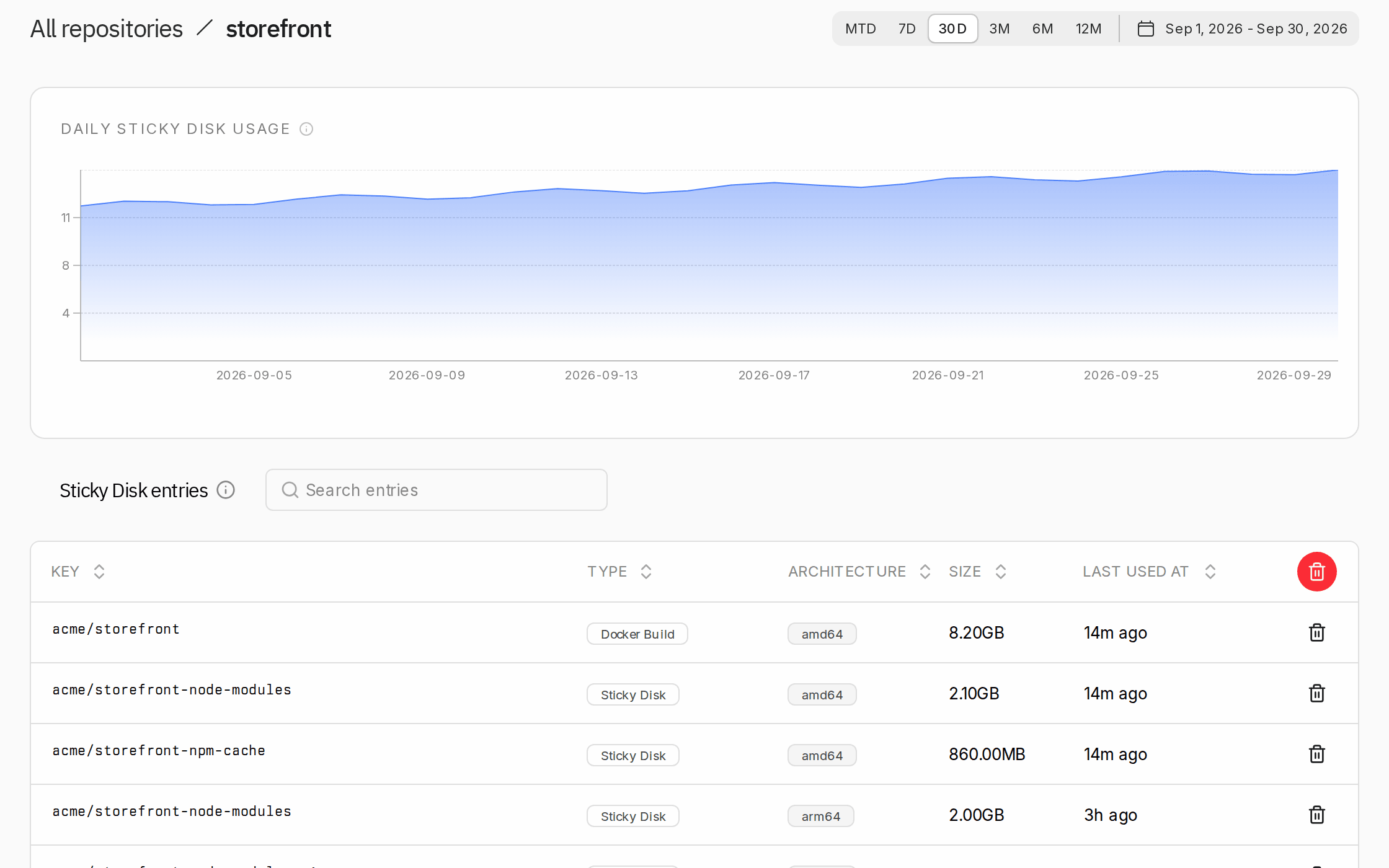
blacksmith stickydisk list | delete).
Pricing
Sticky disks are charged at $0.50/GB/mo. For pricing details, please visit our pricing page.FAQ
What is the eviction policy?
What is the eviction policy?
Sticky disks are automatically evicted after 7 days of inactivity. The “last used” timestamp is updated each time a job mounts the sticky disk. As long as a sticky disk is used at least once within a 7-day window, it will remain available. If no jobs use a sticky disk for 7 consecutive days, it will be automatically purged.